
Introduction to Data Collection
Last updated on 2026-10-17 | Edit this page
Estimated time: 35 minutes
Overview
Questions
- Should I use existing data or collect my own?
- What kinds of geospatial data will I meet in this module?
- How can I tell whether a dataset is good enough for my project?
Objectives
- Describe the main steps of a data collection workflow
- Distinguish vector data from raster data
- Evaluate a dataset using a checklist of quality, license and metadata questions
- Explain what the FAIR principles mean for data you collect and share
Why data collection matters
Every map and every spatial analysis is only as good as the data behind it. For social scientists, the first decision in a project is often the most important one: can I use data that already exists, or do I need to collect my own?
Pre-existing data is everywhere. Governments publish census statistics, administrative boundaries, roads and land cover. Universities run geoportals full of scanned maps and research datasets. Satellites have photographed the whole planet many times over. Using these sources saves time and money, and makes your work easier for others to repeat.
But existing data is not always enough. It may be out of date, too coarse, missing the attribute you need, or simply not exist for your topic. Then you collect original data: with a survey, a field visit, interviews, or by digitizing features from maps and imagery.
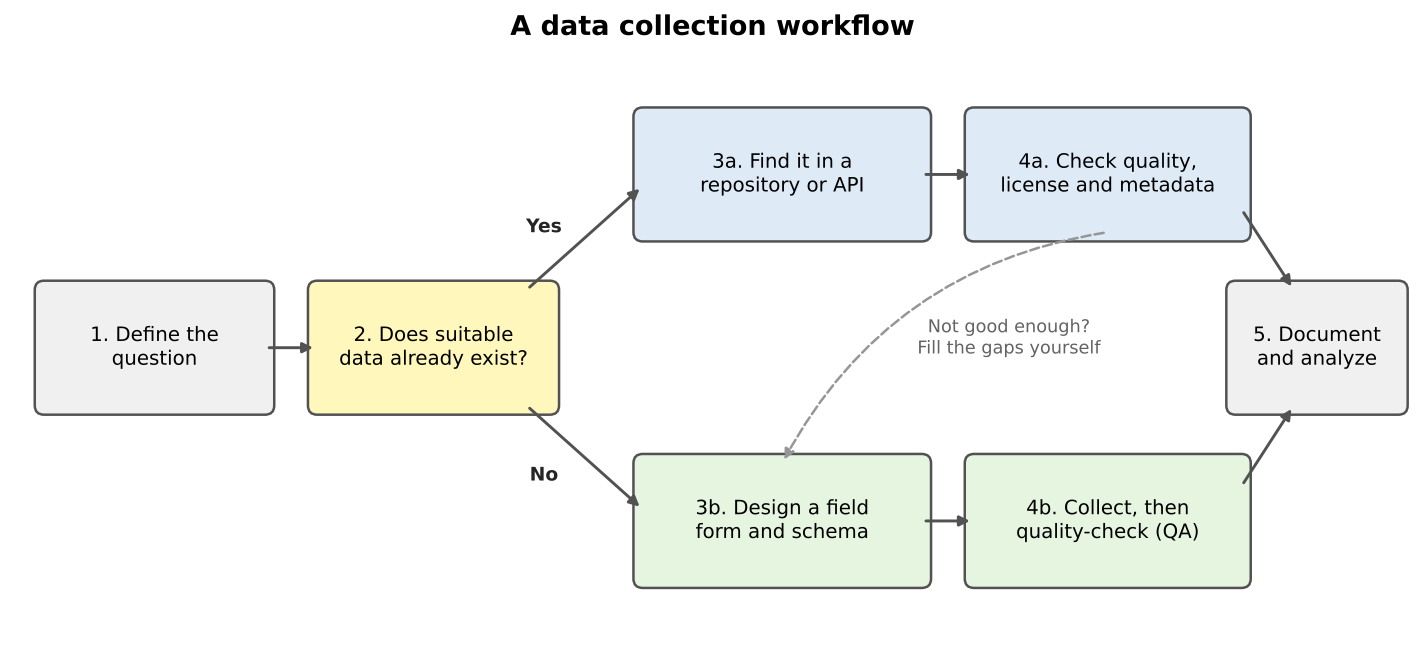
The two paths often meet. In the grocery access case study in the Case Studies module, we take census data and road data from government sources, then add grocery store locations that could be checked or collected in the field, because no official list says where every store is, what it sells, and whether it accepts SNAP benefits.
What this module covers
| Episode | Kind of data | Tools |
|---|---|---|
| Finding Data in Repositories | Vector data from geoportals and open data hubs | Web browser, QGIS |
| Data from the U.S. Census Bureau | Census boundaries and statistics | Web browser, Python (Colab) |
| Geocoding and Adding Spatial Context | Points made from addresses; OpenStreetMap features | Python (Colab) |
| Acquiring Imagery | Scanned maps and satellite imagery (raster) | Web browser, QGIS |
| Collecting Data in the Field | Original observations | QField, QGIS |
Vector and raster data
Geospatial data comes in two basic forms.
- Vector data stores features as points (a store), lines (a road) or polygons (a city boundary), each with a row of attributes in a table. Census boundaries, roads and field observations are vector data.
- Raster data is a grid of cells (pixels), each holding a value: a color, an elevation, a land cover class, a temperature. Satellite images, scanned maps and elevation models are rasters.
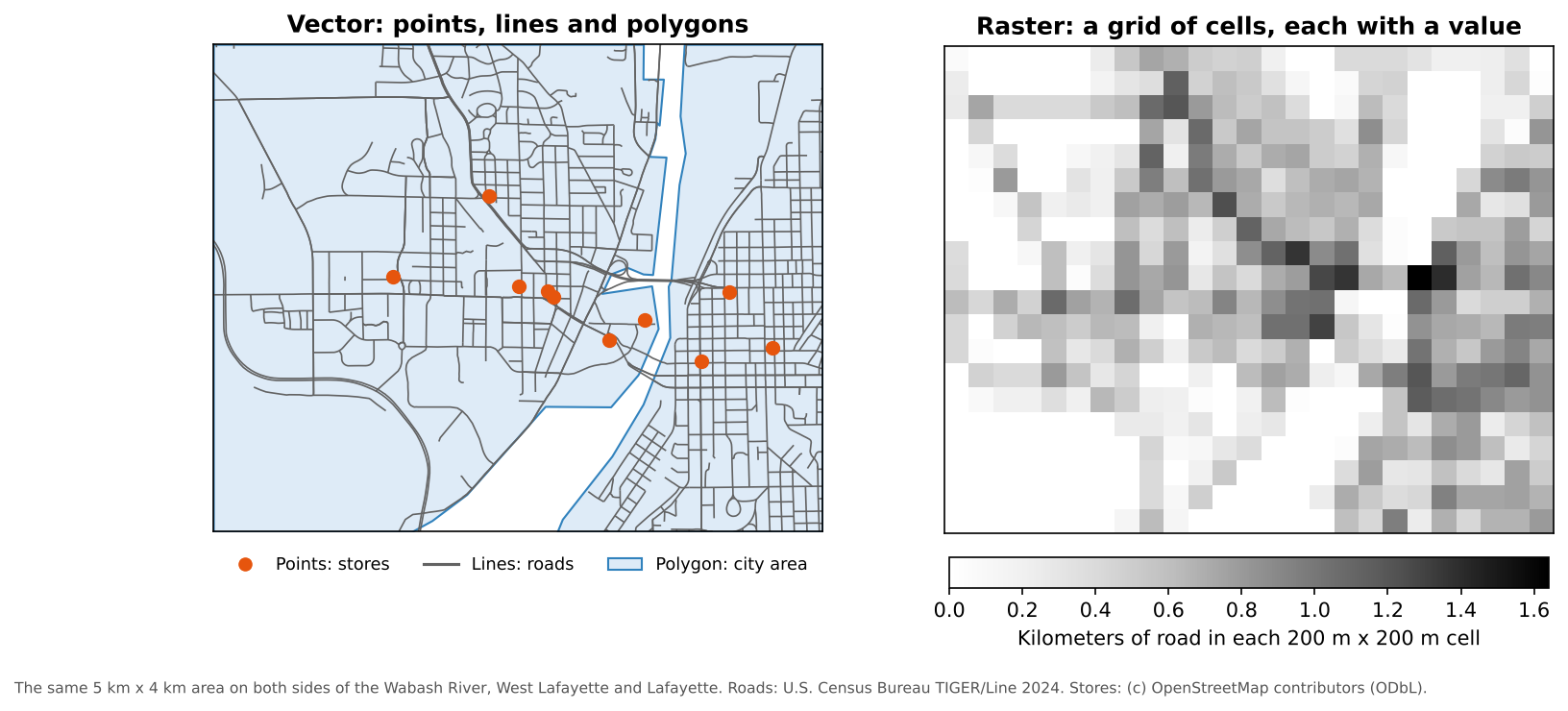
Neither is better; many projects use both. The census and field episodes in this module collect vector data, and the imagery episode collects rasters. The Data Management module’s Geospatial Data Models episode covers both in depth: geometry types, topology, resolution, NoData, and how to choose a model for your question.
Is this dataset good enough?
Before you build a project on someone else’s data, ask a few quick questions:
- Who made it, how and when? A government survey and a crowd-sourced map differ in method, and boundaries, roads and stores change over time.
- Where, and at what detail? Coverage and resolution must match your study area and question.
- What exactly is measured? Read the definitions: “grocery store” or “household” may not mean what you assume.
- How accurate is it, and in what coordinate system?
- Can I use it? Check the license.
Most of these answers are in the dataset’s metadata. Data without metadata is a warning sign. The Data Management module’s Data Quality episode explains the elements of spatial data quality in detail, and the Data Curation module’s Metadata episode shows what good metadata contains.
FAIR data
When you collect or share data yourself, aim to make it FAIR: findable, accessible, interoperable and reusable. The Data Curation module’s Introduction explains the principles, and its later episodes show how to meet them.
Field data that sits in one person’s phone, with column names only they understand, is none of these things. The field episode, and the QField demonstration in the Case Studies module’s grocery access case study, show how a planned form, consistent categories and good notes make field data reusable.
Existing data or new data?
For each research question, decide whether you would start with existing data, collect your own, or both. Name a possible source.
- How has median household income changed in Indiana counties since 2015?
- Which bus stops in your city have a bench and a shelter?
- How much forest was lost around a national park between 1970 and today?
- Existing data. The American Community Survey publishes median household income for every county every year (Data from the U.S. Census Bureau episode).
- Probably both. A transit agency may publish stop locations, but amenities such as benches are often missing or out of date, so you would check them in the field.
- Existing imagery. Declassified CORONA images (1960 to 1972) and modern Landsat or Sentinel-2 images can be compared (Acquiring Imagery episode). You might verify a sample of areas in the field.
Vector or raster?
Would each of these usually be stored as vector or raster data?
- Locations of public libraries
- Air temperature across a state
- School district boundaries
- A scanned 1890 city map
- Vector (points)
- Raster (a continuous surface)
- Vector (polygons)
- Raster (an image), until you trace features from it into vector layers
- Start every project by asking whether suitable data already exists
- Vector data stores discrete features; raster data stores values in a grid of cells
- Check who made a dataset, when, how, at what detail, with what accuracy, and under what license
- Make the data you collect FAIR: findable, accessible, interoperable and reusable