
Fundamentals of Map Design
Last updated on 2026-06-16 | Edit this page
Overview
Questions
- What is a map and what makes it effective?
- How do visual hierarchy and design influence interpretation?
- How should colors and symbols be used in maps?
- What are map scales and projections, and why do they matter?
- What are common thematic map types and when should you use them?
- Should your map be static or interactive?
- How should data be classified for choropleth maps?
Objectives
- Understand the core components and elements of an effective map
- Apply visual hierarchy principles to improve clarity and guide the viewer
- Select appropriate colors, symbols, scales, and projections for your data
- Identify and correctly use different thematic map types
- Choose between static and interactive maps based on your purpose
- Select appropriate data classification methods for choropleth maps
- A map is a communication tool — every design decision should serve a clear purpose.
- Visual hierarchy, color, and symbology guide what the reader notices and how they interpret it.
- No projection is perfect; choose based on what property (area, shape, distance) matters most for your message.
- Match your thematic map type to your data type — choropleth for normalized rates, proportional symbols for magnitudes, dot density for distributions.
- Classification method choice can dramatically change what a choropleth appears to say; always choose intentionally.
- Use interactive maps for exploration; use static maps to communicate a single clear message.
What is a Map?
A map is a visual representation of spatial data designed to communicate information about locations, patterns, and relationships.
A good map:
- Has a clear purpose
- Accurately represents data
- Is easy to interpret
- Minimizes misleading elements
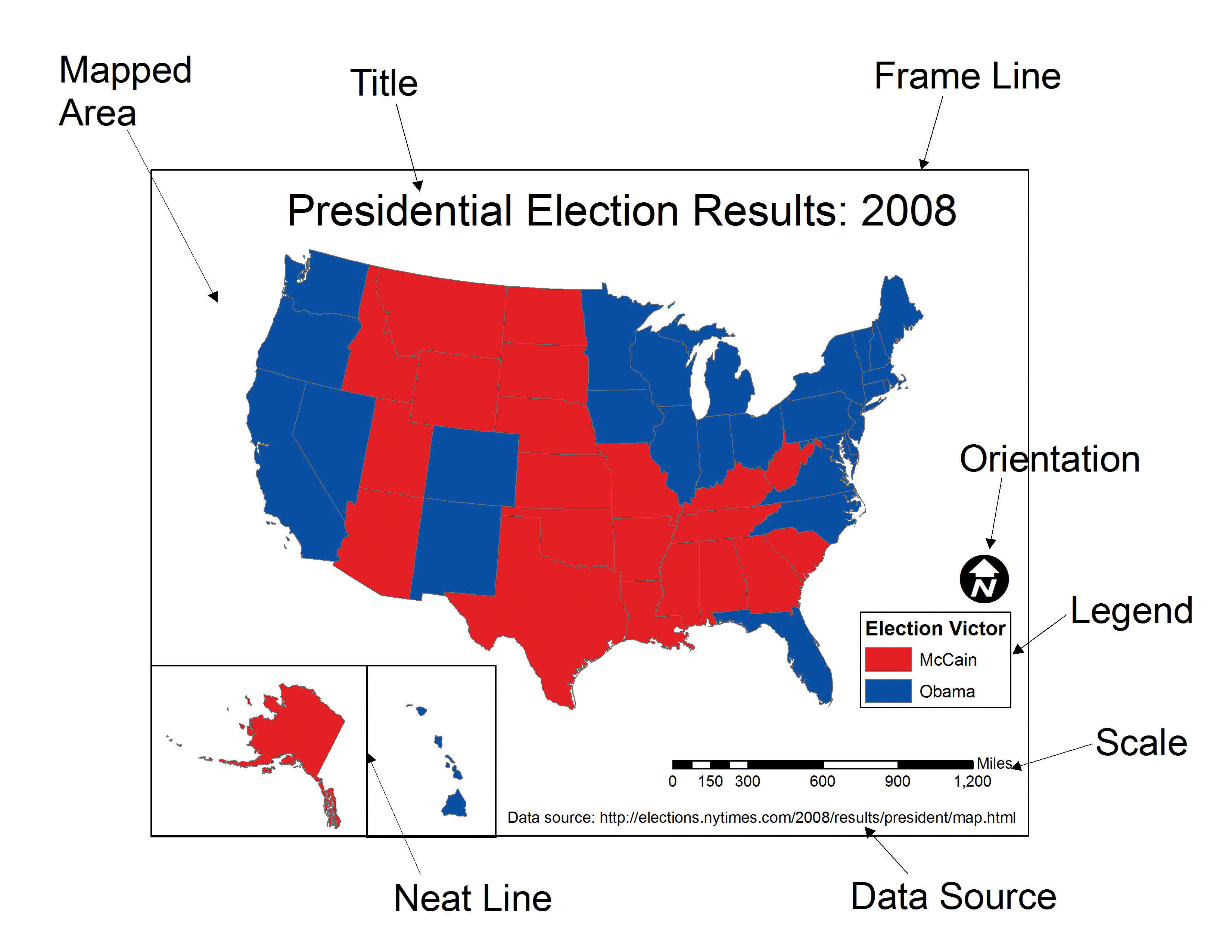
- Includes all essential map elements (title, legend, scale bar, north arrow, data source)
Key Idea
A map is not just a picture — it is a communication tool. Every element you include (or omit) sends a message to your reader.
Visual Hierarchy
Visual hierarchy controls what the viewer notices first, second, and last. A well-structured hierarchy guides the reader’s eye toward the most important information without requiring effort on their part.
How to create hierarchy
| Visual tool | Effect | Practical use |
|---|---|---|
| Size | Larger elements draw attention first | Make your primary data layer the most visually prominent |
| Color | Brighter or contrasting colors stand out | Reserve saturated colors for key data; mute the basemap |
| Position | Central elements are noticed before edge elements | Place your main map center-frame; push supporting elements to margins |
| Contrast | Strong differences between elements signal importance | High contrast between data and background keeps the data readable |
Applied example
- Main data layer → bold, saturated colors
- Background basemap → muted, desaturated tones
- Labels → legible but visually subordinate to the data
Analyzing Hierarchy in the Wild
Find any map — in a news article, a textbook, or online.
- What is the first thing your eye goes to?
- Is that the element the mapmaker intended to be most prominent?
- If not, what design choice created the unintended emphasis (color, size, position)?
Visual Variables in Mapping
Cartographic variables (also called visual variables) are the visual properties used to encode data on a map. Choosing the right variable for your data type is one of the most important decisions in map design.
The main visual variables and their appropriate uses
| Visual variable | Best data type | Example |
|---|---|---|
| Color hue (distinct colors) | Categorical / nominal | Land use types, political parties |
| Color value (light → dark) | Quantitative / ordered | Population density, income levels |
| Size | Quantitative at point locations | City population, earthquake magnitude |
| Shape | Categorical at point locations | Hospital vs. school vs. fire station |
| Orientation | Directional data | Wind direction, flow arrows |
| Texture / pattern | Categorical areas (especially print) | Zoning districts, vegetation types |
Colors on Maps
Color is the most powerful visual variable on a map — and the most commonly misused. The right color scheme depends entirely on the type of data you are encoding.
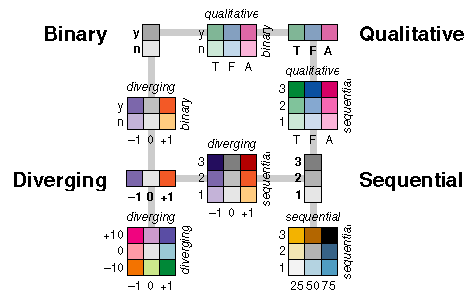
Types of color schemes
- Sequential → for data that runs from low to high values; colors progress from light to dark (e.g., pale yellow → dark red for population density).
- Diverging → for data that varies around a meaningful midpoint such as zero or an average; colors diverge in two directions (e.g., blue–white–red for temperature anomaly).
- Categorical → for data with distinct groups and no inherent order; uses visually distinct hues (e.g., land cover classes).
Best practices
- Use lighter shades for lower values and darker shades for higher values in sequential schemes — this matches most readers’ intuition.
- Avoid overly bright or clashing colors, which increase cognitive load and fatigue.
- Always use colorblind-friendly palettes. Approximately 8% of men have some form of color vision deficiency; red-green combinations are the most common problem. Tools like ColorBrewer provide tested, accessible palettes.
- Ensure sufficient contrast between adjacent classes so boundaries are visible without needing to zoom in.
Tip
When in doubt, use ColorBrewer. It provides sequential, diverging, and categorical palettes that are colorblind-safe, print-friendly, and photocopy-safe — with a filter to find schemes that meet all three criteria simultaneously.
Scale
Map scale defines the relationship between a distance measured on the map and the corresponding distance on the ground.
Two types of scale
- Large-scale maps cover a small geographic area with a high level of detail (e.g., a neighborhood street map at 1:5,000). Individual buildings, paths, and features are distinguishable.
- Small-scale maps cover a large geographic area with less detail (e.g., a world map at 1:50,000,000). Only major features such as country borders and major rivers are shown.
Why scale matters
- It determines what level of detail is visible and appropriate to include.
- Features that look correct at one scale can be misleading or meaningless at another — a neighborhood-level pattern should not be inferred from a country-level map.
- Always display a scale bar (not just a ratio) so readers can estimate real-world distances regardless of how the map is printed or displayed.
Projections
A map projection is a mathematical transformation used to represent the curved surface of the Earth on a flat plane. Because it is geometrically impossible to flatten a sphere without distortion, every projection sacrifices at least one spatial property.
The four properties that can be distorted
- Area — regions may appear larger or smaller than they actually are
- Shape — the outlines of regions may be stretched or compressed
- Distance — measured distances may be inaccurate except along specific lines
- Direction — angles and bearings may not be preserved
Common projection families and their trade-offs
| Projection family | What it preserves | Common use |
|---|---|---|
| Equal-area (e.g., Albers, Mollweide) | Area | Thematic maps where region size comparison matters |
| Conformal (e.g., Mercator, Lambert) | Local shape and angles | Navigation, large-scale topographic maps |
| Equidistant (e.g., Azimuthal equidistant) | Distance from a central point | Radial distance maps, some atlases |
| Compromise (e.g., Robinson, Winkel Tripel) | None perfectly, but minimizes all | General-purpose world maps |
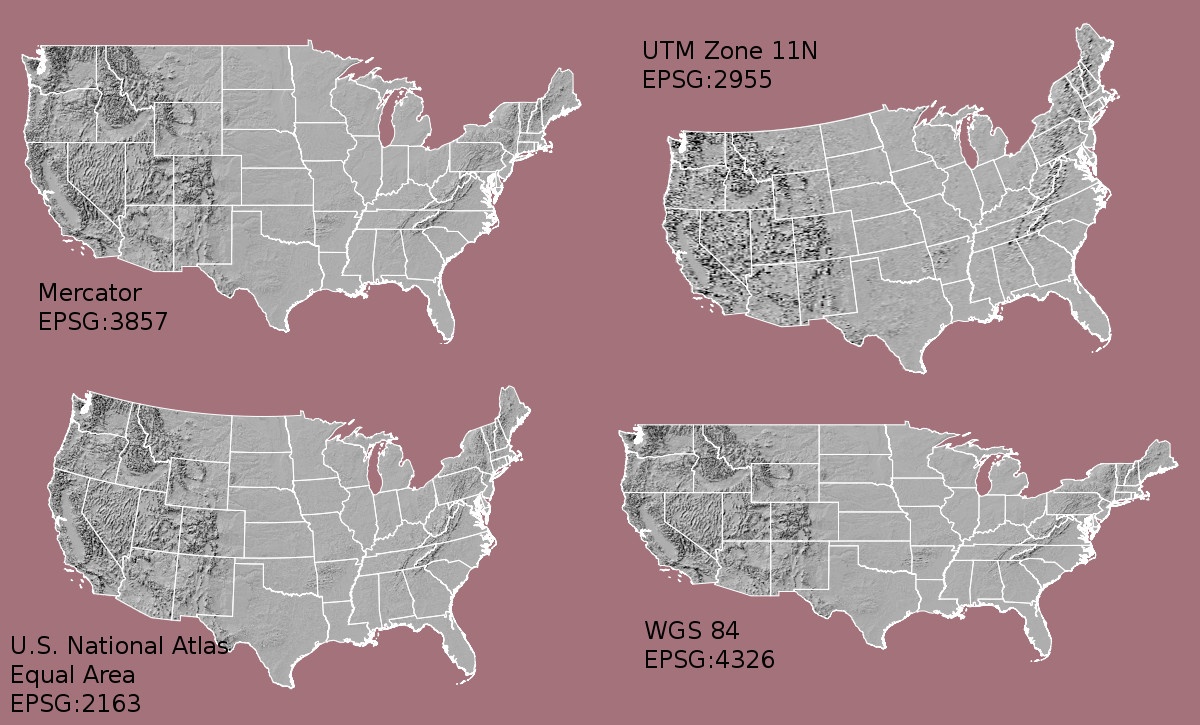
To see just how dramatically the Mercator projection distorts the apparent size of countries, try The True Size Of…. You can drag a country to different latitudes and compare its true size against others. Try dragging Russia down to where Africa sits — the size difference is striking.
Important
There is no universally “correct” projection — only projections suited to specific purposes. For U.S. Census and demographic work, the Albers Equal Area Conic projection is standard because it preserves area relationships between states and counties.
Labeling and Legends
Labels and legends are not optional decoration — they are what transform a spatial image into a readable map. A map without a legend or with ambiguous labels forces the reader to guess.
Labels
- Use a font size and weight that is readable at the intended display size (screen or print).
- Place labels to avoid overlapping other features; offset or use leader lines where needed.
- Apply a visual hierarchy to labels — names of major features should be larger or bolder than minor ones.
- Use halos (white outlines behind text) to keep labels legible over varied backgrounds.
Legends
- Every encoded variable (color, size, symbol shape) must be explained in the legend.
- Keep legend entries concise and use plain language — avoid variable
codes like
B19013_001Ein favor of “Median Household Income.” - Always include units (e.g., “per 1,000 residents” or “USD, 2021”).
- Order legend entries logically — low to high for sequential data, alphabetically for categories.
When to omit map elements
Not every map needs every element. Omit a north arrow if north is obviously up and the audience will know this. Omit a scale bar on schematic or concept maps where exact distance is not the point. However, when in doubt, include it — a reader who does not need it will ignore it; a reader who does need it will be stuck without it.
Thematic Map Types
A thematic map uses visual variables to show the spatial distribution of one or more attributes. Choosing the wrong map type for your data is one of the most common cartographic errors. The sections below describe the most common types, what they are best suited for, and what to avoid.
Choropleth Maps
A choropleth map uses color value (light to dark) to represent a single quantitative attribute aggregated over geographic regions such as counties, states, or countries.
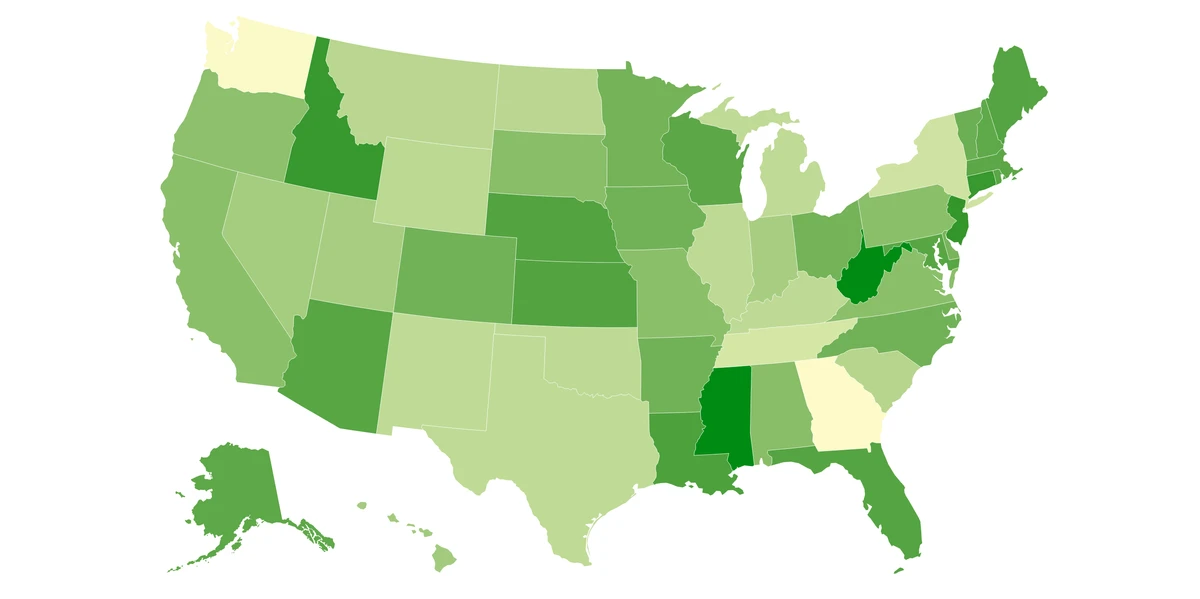
Best for: Rates, ratios, and normalized data — for example, population per square kilometer, median income, or percentage of residents with a college degree.
Avoid for: Raw counts (e.g., total population). Larger regions will almost always have higher raw counts than smaller regions, making the map reflect area size rather than the phenomenon of interest. Always normalize before using a choropleth.
Proportional Symbol Maps
A proportional symbol map scales a symbol (typically a circle) at each location in proportion to the data value at that point.
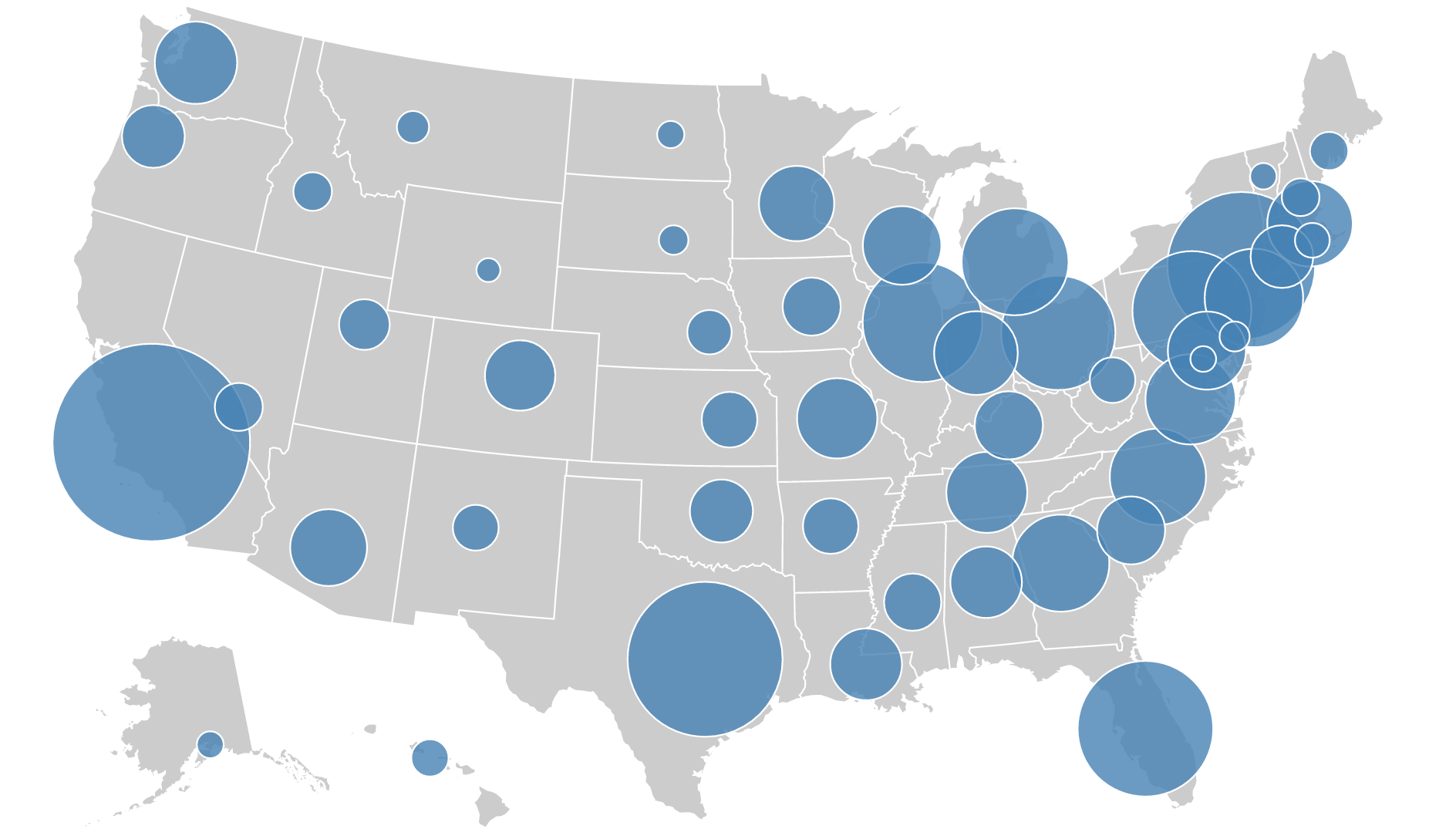
Best for: Comparing absolute magnitudes across discrete locations — for example, total population of cities, number of COVID cases per hospital, or total exports per port.
Avoid for: Continuous phenomena that cover entire regions without discrete point locations.
Dot Density Maps
A dot density map places a fixed number of dots within each geographic unit, where each dot represents a set quantity of the mapped phenomenon.
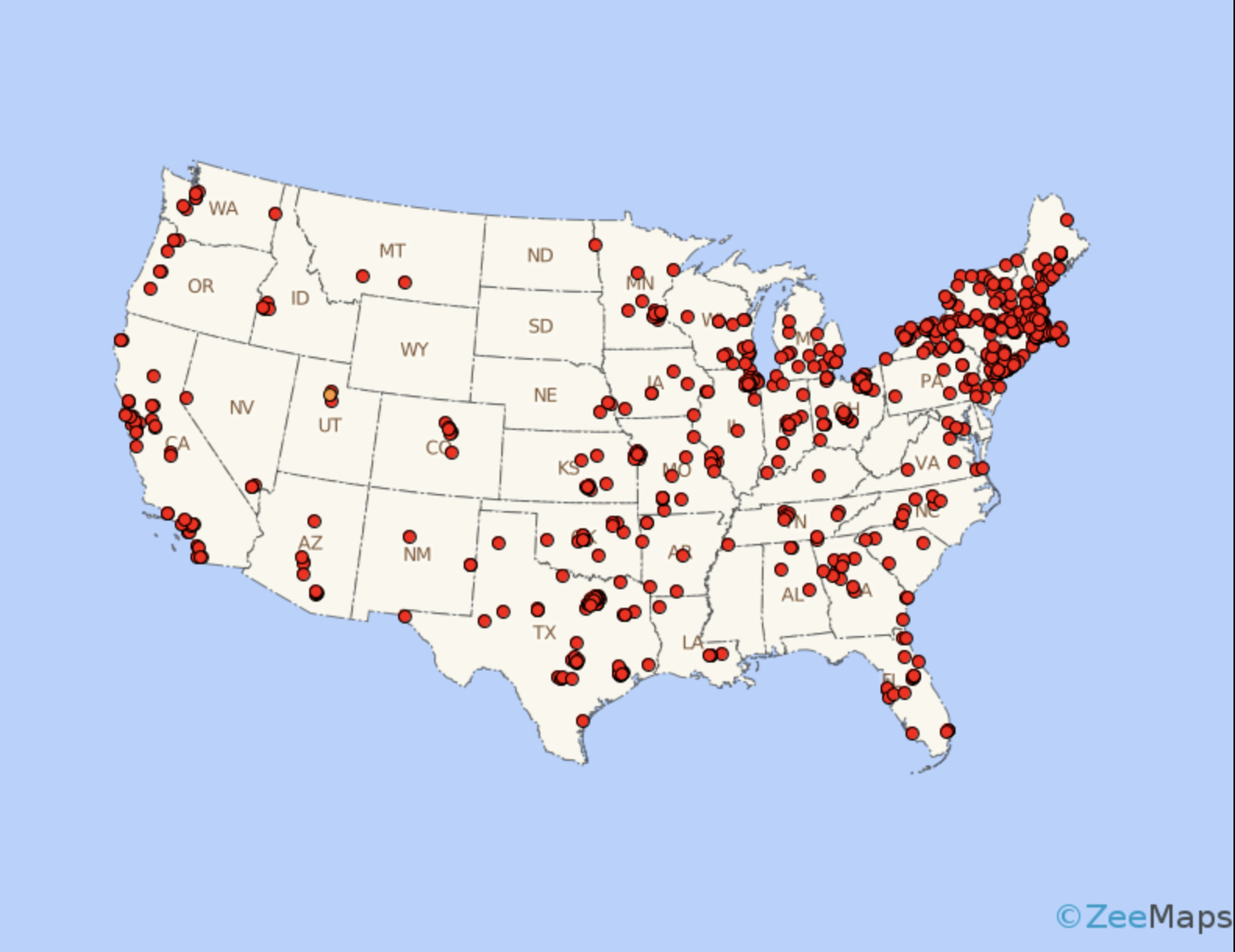
Best for: Showing the spatial distribution and relative density of a phenomenon — for example, one dot = 1,000 people, or one dot = 500 farms.
Avoid for: Precise counts or when the geographic unit boundaries would create artificial clustering effects.
Non-Contiguous Cartograms
A non-contiguous cartogram resizes each geographic region in proportion to a data value, then separates the regions so their recognized outlines are preserved without overlap.
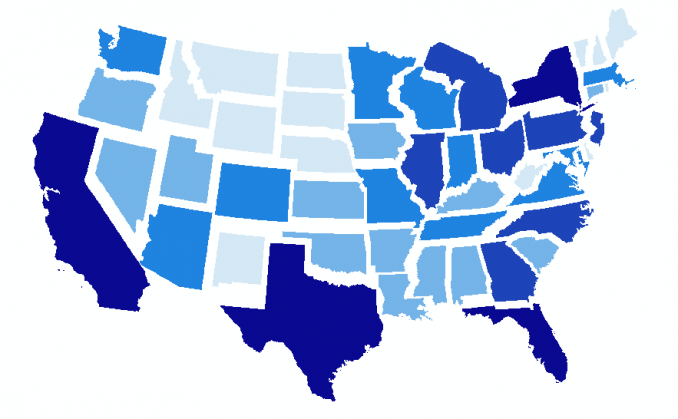
Best for: Emphasizing the magnitude of a phenomenon (such as GDP or electoral votes) when geographic area would otherwise dominate and mislead.
Note: Readers may find cartograms disorienting if they are unfamiliar with the genre. A brief explanatory note in the map caption or title can help.
Multivariate Maps
A multivariate map encodes two or more variables simultaneously using different visual variables — for example, color for one attribute and symbol size for another.
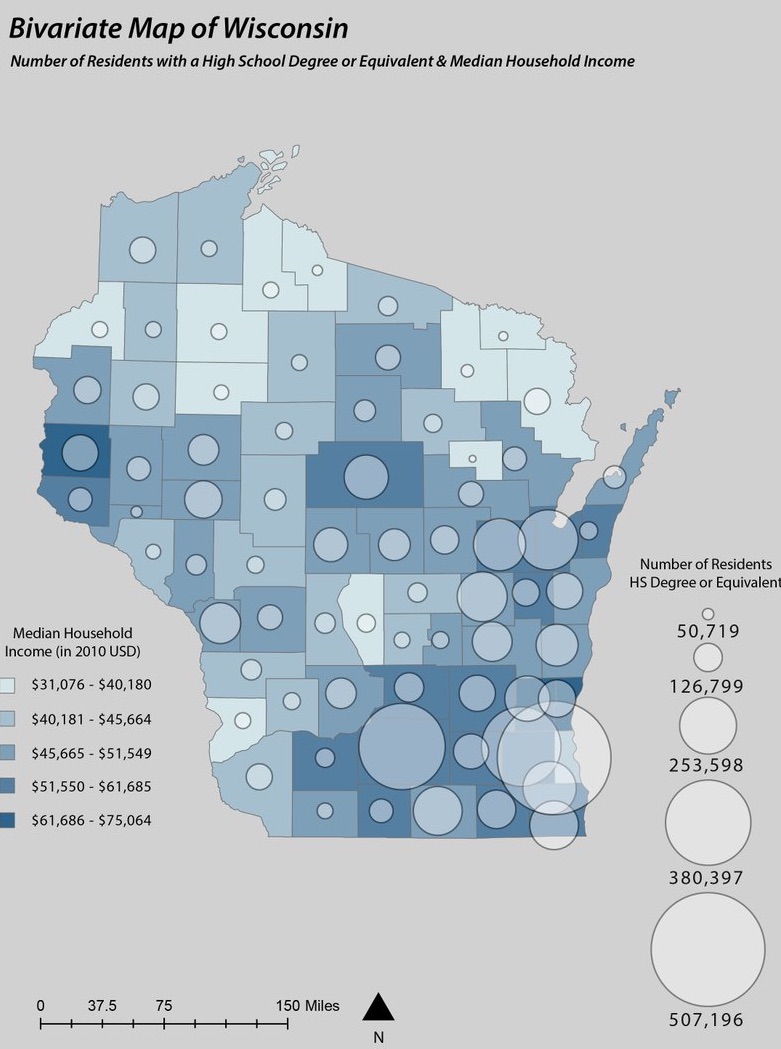
Best for: Exploring the spatial relationship between two variables — for example, income (color) alongside educational attainment (symbol size) to reveal where they correlate or diverge.
Use with caution: Multivariate maps can become visually overwhelming quickly. Limit to two variables when possible, and only add a third if the relationship between all three is genuinely the story you are telling.
Static vs. Interactive Maps
The display context — whether a map will be printed, embedded in a report, or viewed in a browser — is a fundamental design constraint that should be decided before any other design choices are made.
Static maps
- Produce a fixed image (PNG, PDF, SVG) with no user interaction.
- Best suited for print publications, academic reports, and presentations where a single message needs to be communicated clearly.
- Give the mapmaker full control over what the reader sees.
- All the thematic map examples shown above are static maps.
Interactive (web) maps
- Delivered through a browser and allow users to zoom, pan, toggle layers, and hover for tooltips.
- Best suited for exploratory analysis, public-facing data portals, and situations where readers need to look up specific locations.
- Require more development effort and may need ongoing maintenance.
- See a live example on the workshop website — scroll down to find the interactive map of West Lafayette.
Capabilities comparison
| Feature | Static map | Interactive map |
|---|---|---|
| Zoom and pan | No | Yes |
| Layer toggling | No | Yes |
| Hover / click for details | No | Yes |
| Print quality | High | Varies |
| Design control | Full | Partial |
| Development effort | Low | Higher |
| Best for | Single clear message | User-driven exploration |
Guideline
Use interactive maps when readers need to explore, filter, or look up specific values in the data. Use static maps when you want to communicate a single, pre-determined message as clearly as possible.
Data Classification Methods
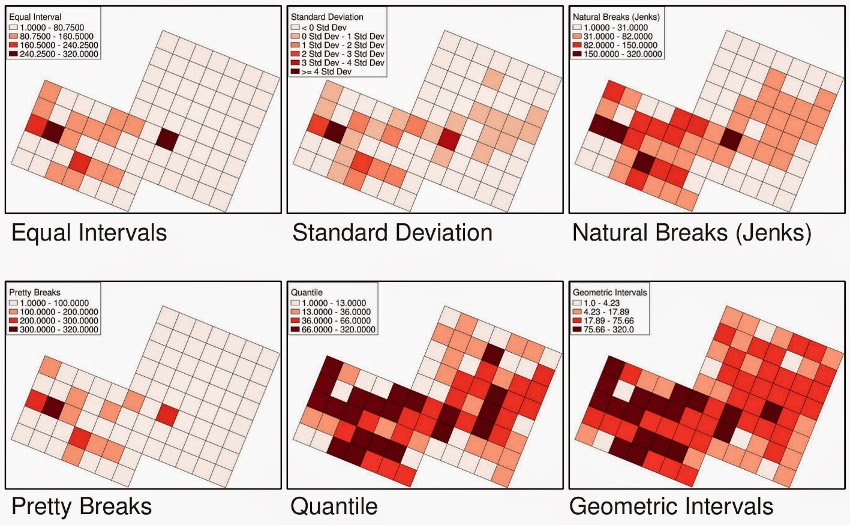
When creating a choropleth map, continuous numeric data must be grouped into a small number of classes (typically 4–7) so that distinct colors can be assigned. The method used to define those class boundaries has a large effect on the visual pattern the map produces — and therefore on what story it appears to tell.
Equal Interval
Divides the full data range into bins of equal width. If income ranges from $25k to $125k and you want 5 classes, each class spans $20k.
- Best for: Data that is roughly evenly distributed across its range.
- Weakness: If data is skewed or clustered, most observations may fall into just one or two classes, leaving others nearly empty.
Quantile
Places an equal number of observations in each class, regardless of the value range each class covers.
- Best for: Comparing the relative rank of places — showing which third or fifth of the distribution each region falls into.
- Weakness: Two regions with very similar values can end up in different classes if they happen to straddle a class boundary.
Natural Breaks (Jenks)
Identifies class boundaries at the natural gaps in the data distribution — the points where the difference between adjacent values is largest. This minimizes within-class variance and maximizes between-class variance.
- Best for: Data with clear clusters or uneven distributions where natural groupings exist.
- Beginner recommendation: When in doubt, start here. Natural Breaks tends to produce the most honest visual representation of the underlying data structure.
Standard Deviation
Classes are defined by distance from the mean, measured in standard deviations (e.g., more than 1 SD above average, within 1 SD, more than 1 SD below average).
- Best for: Highlighting regions that deviate significantly from the norm — useful for anomaly detection or showing extremes.
- Weakness: Assumes readers understand what a standard deviation is; may need explanation in the map or caption.
Choosing the right method
| Method | Best use case | Watch out for |
|---|---|---|
| Equal Interval | Uniform, evenly spread data | Misleading with skewed distributions |
| Quantile | Ranking and relative comparison | Similar values split across classes |
| Natural Breaks | Clustered or uneven data | Class boundaries shift if data changes |
| Standard Deviation | Identifying anomalies and extremes | Requires statistical literacy in the audience |
Choosing a Classification Method
You have U.S. county median household income data ranging from $25,000 to $150,000. Summary statistics show that most counties cluster between $45,000 and $75,000, with a small number of very high-income outliers pulling the upper tail.
- Which classification method would you choose and why?
- Which method would produce the most misleading map for this data, and what would it get wrong?
- How many classes would you use, and how did you decide?
Final Takeaways
- Maps are communication tools — every design decision should be intentional and serve your stated purpose.
- Match your thematic map type to your data type and your message, not to personal preference.
- Color scheme, projection, and classification method choices are not aesthetic — they directly affect what your map appears to say.
- Always consider who your audience is and what they need to walk away understanding.
- When in doubt about any single design decision, ask: “Does this choice make the map easier to read, or harder?”