
Network Analysis
Last updated on 2026-10-25 | Edit this page
Estimated time: 85 minutes
Overview
Questions
- How can a road map be represented as a graph?
- How do we download and visualize road networks from OpenStreetMap?
- How do we find the shortest route and measure travel time?
- How do routes turn into measures of access, and what can go wrong?
Objectives
- Explain nodes and edges in a road network
- Download a drivable network with OSMnx and inspect it as GeoDataFrames
- Compute shortest paths by distance and by travel time
- Measure travel time from many locations to one point, the basis of an access study
- Choose a network type and an access measure that fit the research question, and recognize the assumptions behind them
Why network analysis?
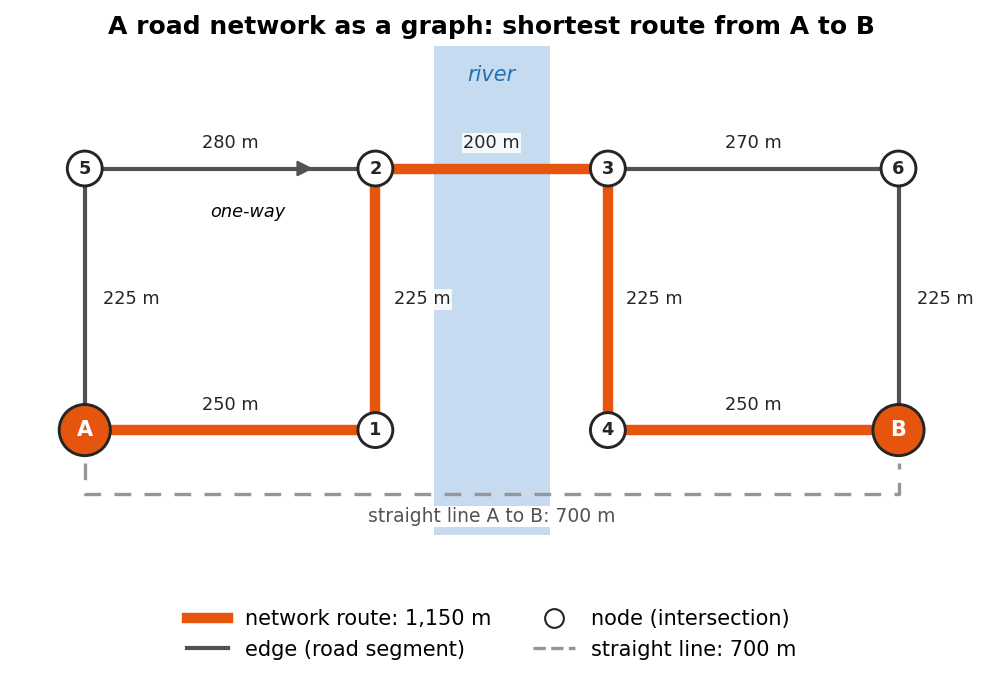
Straight line distance is misleading: a store 1 km away across a river may be a 6 km drive. Network analysis measures distance along roads, which is how people actually travel.
Road networks are stored as graphs:
- Nodes are intersections and dead ends
- Edges are road segments, each with a length (and, once added, a speed and travel time)
Common uses include food and health care access, emergency response times, and transportation planning.
Thinking in graphs
A graph is a simple idea: a set of points (nodes) and the connections between them (edges). In a road network, nodes are intersections and dead ends, and each edge is the stretch of road between two of them. Everything else is stored as attributes of the edges:
| Edge attribute | Example | Used for |
|---|---|---|
length |
212.4 (meters) | Shortest path by distance |
highway |
residential, primary
|
Road type, and a default speed |
maxspeed |
30 mph |
Travel time, where speed limits are mapped |
oneway |
True |
Which directions can be traveled |
travel_time |
18.3 (seconds) | Fastest path, once added |
Three details matter for analysis:
- Direction. Streets can be one-way, so OSMnx stores roads as a directed graph: a two-way street is two edges, one in each direction. The route from A to B can therefore differ from the route from B to A.
-
Weights. The “shortest” path depends on what each
edge costs. With
lengthas the weight you get the shortest route; withtravel_timeyou get the fastest. You can also build your own weights, for example a walking cost that penalizes steep or busy roads. - Simplification. OpenStreetMap draws a curving road with many small points. OSMnx removes the points that are not intersections, so each node is a real decision point and each edge keeps its full curved shape and length.
Choosing the network type
The network_type argument decides which roads and paths
are kept:
network_type |
Includes | Direction |
|---|---|---|
"drive" |
Public roads open to cars | One-way rules apply |
"walk" |
Streets and paths pedestrians can use, including footpaths where they are mapped; no motorways | Every edge can be walked both ways |
"bike" |
Streets and paths where cycling is allowed | One-way rules apply |
Pick the network that matches the people you study. A household without a car experiences the walking or transit network, not the driving one, and the two can give very different answers about access.
The same analysis in QGIS
The Case Studies module’s grocery access case study measures shortest paths and service areas to supermarkets in Lafayette and West Lafayette with QGIS’s network tools, without writing code. Doing both is a good way to see what OSMnx does behind the scenes.
If you have not used OpenStreetMap tags before, the Data Collection module’s Geocoding episode introduces them.
Draw a small graph on the board (four intersections, five roads)
before showing any code. Learners grasp nearest_nodes and
shortest_path much faster once they can picture nodes and
edges. Note that nearest_nodes takes longitude first.
1. Download a road network
PYTHON
import osmnx as ox
import networkx as nx

G = ox.graph_from_place("West Lafayette, Indiana, USA", network_type="drive")
print(G.number_of_nodes(), "nodes,", G.number_of_edges(), "edges")
ox.plot_graph(G, node_size=5, edge_color="gray", bgcolor="white")
network_type can also be "walk" or
"bike". The graph is held in memory as G.
2. Look at nodes and edges as tables
3. Add speeds and travel times
4. Find the shortest route between two points
5. Measure the route
PYTHON
route_edges = ox.routing.route_to_gdf(G, route)
print(round(route_edges["length"].sum() / 1000, 2), "km")
print(round(route_edges["travel_time"].sum() / 60, 1), "minutes")
Challenge 1: Shortest or fastest?
Compute the route between the same two points with
weight="length" and with weight="travel_time".
Are they the same route? Which is longer in kilometers?
PYTHON
for w in ["length", "travel_time"]:
    e = ox.routing.route_to_gdf(G, ox.shortest_path(G, start, end, weight=w))
    print(w, round(e["length"].sum() / 1000, 2), "km",
          round(e["travel_time"].sum() / 60, 1), "min")
The fastest route often uses faster main roads and can be a little longer in distance.
Challenge 2: Travel time to everywhere
Use
nx.single_source_dijkstra_path_length(G, start, weight="travel_time")
to get the travel time from start to every node. What is
the longest drive time (in minutes) within the city?
From routes to access
A single route answers “how far is it from here to there?”. Access studies ask a broader question: how easily can people reach the things they need? Network analysis supports several common measures:
| Measure | Question | Built from |
|---|---|---|
| Nearest facility | How far, or how long, is it to the closest store, clinic or school? | Paths from each home or neighborhood to every facility, keeping the minimum |
| Cumulative opportunities | How many jobs or stores can be reached within 15 minutes? | Travel times from each origin, counting the destinations under a threshold |
| Service area (isochrone) | Which streets or areas lie within 10 minutes of a facility? | Travel times outward from the facility (Challenge 2 is the start of one) |
| Origin-destination matrix | What is the travel time between every origin and every destination? | Paths for every pair; the basis of the measures above and of gravity models |
Notebook 1c builds a nearest facility measure for grocery stores.
Getting on and off the network
Homes, stores and clinics are not nodes. Before routing, each
location is snapped to the nearest node with
ox.nearest_nodes. This works well in a dense street grid,
but check the snapping distance when places are far from a road, such as
a store in a large parking lot or a rural farm. The route starts at the
snapped node, not at the front door, and a point can snap to a road on
the wrong side of a river or highway.
PYTHON
node, dist = ox.nearest_nodes(G, X=-86.9112, Y=40.4247, return_dist=True)
print(node, round(dist), "meters from the network")   # flag large distances
return_dist reports the distance in the units of the
graph. A graph from graph_from_place is in latitude and
longitude, where OSMnx measures this distance in meters along the
Earth’s surface.
Assumptions and pitfalls
A network result is only as good as the network and the assumptions behind it:
-
Speeds are estimates.
add_edge_speedsuses mapped speed limits, the average speed of other roads of the same type, or thefallbackvalue. It ignores traffic, traffic lights and turns, so real drive times are usually longer, especially at rush hour. - The map may be incomplete. OpenStreetMap is very good in most U.S. cities, but it can miss footpaths, new roads or turn restrictions. Look at the network before trusting it.
-
Edge effects. A network downloaded for one city
stops at the city limits. Trips that leave the city and come back, and
stores just outside it, are missed. Download a larger area than your
study area (for example with
ox.graph_from_pointand a generousdist, orox.graph_from_polygonwith a buffered boundary), then analyze only the origins inside the study area. - Mode and time of day. A driving network says nothing about buses, schedules or sidewalks. Public transit needs timetable data (GTFS) and dedicated tools.
- Distance is not the whole story. Cost, safety, opening hours and quality of service also shape real access.
Challenge 3: Which network, which measure?
A health department asks you to find neighborhoods where older adults
without cars live more than 20 minutes from a pharmacy. Which
network_type would you use, which access measure, and what
would you set or check before trusting the result?
- The walking network
(
network_type="walk"), because the people in question do not drive. Ideally you would add public transit as well. - A nearest facility measure: the walking time from each neighborhood to the closest pharmacy, flagged where it is above 20 minutes.
- OSMnx speeds are for cars, so set a walking speed yourself, for
example
G.edges[u, v, k]["travel_time"] = length / speed, with a speed in meters per second. Older adults often walk more slowly than the 4 to 5 km/h usually assumed. - Check that the pharmacy list is complete, download the network beyond the neighborhoods to avoid edge effects, and check the snapping distances of homes and pharmacies.
Math
A network is a graph \(G = (V, E)\), where \(V\) is the set of nodes (intersections) and \(E\) the set of edges (road segments). Each edge \(e\) has a weight \(w_e\), such as length or travel time. The shortest path between two nodes is the route whose total weight \(\sum_{e \in \text{route}} w_e\) is smallest. OSMnx finds it with Dijkstra’s algorithm.
Dijkstra’s algorithm works outward from the start like a ripple. It keeps the best known cost to every node, always settles the unvisited node with the lowest cost next, and then updates the costs of that node’s neighbors. When the destination is settled, its cost is final. This only works when every weight is zero or positive, which is true for lengths and travel times.
- Road networks are graphs of nodes (intersections) and edges (road segments)
-
ox.graph_from_placedownloads OpenStreetMap roads for any named place -
add_edge_speedsandadd_edge_travel_timeslet you route by time instead of distance -
nearest_nodes(longitude first),shortest_pathandroute_to_gdfcover most routing tasks - Network distance is more realistic than straight line distance for access studies
- Match the network type to the people you study, and choose an access measure (nearest facility, cumulative opportunities, service area) that fits the question
- Check snapping distances and edge effects, and remember that speeds are estimates without traffic
Notebooks
| Level | Notebook | What you will do |
|---|---|---|
| Beginner | 1a. Road Networks: Nodes and Edges | Download, plot, inspect and save a road network |
| Intermediate | 1b. Shortest Paths and Travel Time | Route between two points and map travel time across the city |
| Advanced | 1c. Travel Time to Grocery Stores | Route from every OSM grocery store to the town center |