
All in One View
Content from Network Analysis
Last updated on 2026-10-25 | Edit this page
Estimated time: 85 minutes
Overview
Questions
- How can a road map be represented as a graph?
- How do we download and visualize road networks from OpenStreetMap?
- How do we find the shortest route and measure travel time?
- How do routes turn into measures of access, and what can go wrong?
Objectives
- Explain nodes and edges in a road network
- Download a drivable network with OSMnx and inspect it as GeoDataFrames
- Compute shortest paths by distance and by travel time
- Measure travel time from many locations to one point, the basis of an access study
- Choose a network type and an access measure that fit the research question, and recognize the assumptions behind them
Why network analysis?
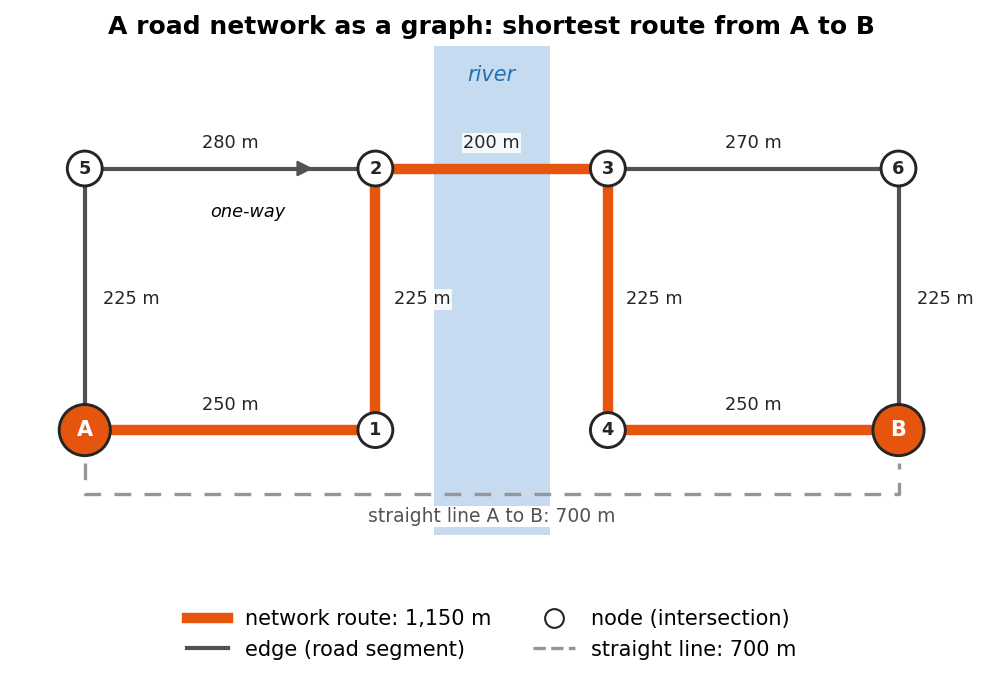
Straight line distance is misleading: a store 1 km away across a river may be a 6 km drive. Network analysis measures distance along roads, which is how people actually travel.
Road networks are stored as graphs:
- Nodes are intersections and dead ends
- Edges are road segments, each with a length (and, once added, a speed and travel time)
Common uses include food and health care access, emergency response times, and transportation planning.
Thinking in graphs
A graph is a simple idea: a set of points (nodes) and the connections between them (edges). In a road network, nodes are intersections and dead ends, and each edge is the stretch of road between two of them. Everything else is stored as attributes of the edges:
| Edge attribute | Example | Used for |
|---|---|---|
length |
212.4 (meters) | Shortest path by distance |
highway |
residential, primary
|
Road type, and a default speed |
maxspeed |
30 mph |
Travel time, where speed limits are mapped |
oneway |
True |
Which directions can be traveled |
travel_time |
18.3 (seconds) | Fastest path, once added |
Three details matter for analysis:
- Direction. Streets can be one-way, so OSMnx stores roads as a directed graph: a two-way street is two edges, one in each direction. The route from A to B can therefore differ from the route from B to A.
-
Weights. The “shortest” path depends on what each
edge costs. With
lengthas the weight you get the shortest route; withtravel_timeyou get the fastest. You can also build your own weights, for example a walking cost that penalizes steep or busy roads. - Simplification. OpenStreetMap draws a curving road with many small points. OSMnx removes the points that are not intersections, so each node is a real decision point and each edge keeps its full curved shape and length.
Choosing the network type
The network_type argument decides which roads and paths
are kept:
network_type |
Includes | Direction |
|---|---|---|
"drive" |
Public roads open to cars | One-way rules apply |
"walk" |
Streets and paths pedestrians can use, including footpaths where they are mapped; no motorways | Every edge can be walked both ways |
"bike" |
Streets and paths where cycling is allowed | One-way rules apply |
Pick the network that matches the people you study. A household without a car experiences the walking or transit network, not the driving one, and the two can give very different answers about access.
The same analysis in QGIS
The Case Studies module’s grocery access case study measures shortest paths and service areas to supermarkets in Lafayette and West Lafayette with QGIS’s network tools, without writing code. Doing both is a good way to see what OSMnx does behind the scenes.
If you have not used OpenStreetMap tags before, the Data Collection module’s Geocoding episode introduces them.
Draw a small graph on the board (four intersections, five roads)
before showing any code. Learners grasp nearest_nodes and
shortest_path much faster once they can picture nodes and
edges. Note that nearest_nodes takes longitude first.
1. Download a road network
PYTHON
import osmnx as ox
import networkx as nx

G = ox.graph_from_place("West Lafayette, Indiana, USA", network_type="drive")
print(G.number_of_nodes(), "nodes,", G.number_of_edges(), "edges")
ox.plot_graph(G, node_size=5, edge_color="gray", bgcolor="white")
network_type can also be "walk" or
"bike". The graph is held in memory as G.
2. Look at nodes and edges as tables
3. Add speeds and travel times
4. Find the shortest route between two points
5. Measure the route
PYTHON
route_edges = ox.routing.route_to_gdf(G, route)
print(round(route_edges["length"].sum() / 1000, 2), "km")
print(round(route_edges["travel_time"].sum() / 60, 1), "minutes")
Challenge 1: Shortest or fastest?
Compute the route between the same two points with
weight="length" and with weight="travel_time".
Are they the same route? Which is longer in kilometers?
PYTHON
for w in ["length", "travel_time"]:
    e = ox.routing.route_to_gdf(G, ox.shortest_path(G, start, end, weight=w))
    print(w, round(e["length"].sum() / 1000, 2), "km",
          round(e["travel_time"].sum() / 60, 1), "min")
The fastest route often uses faster main roads and can be a little longer in distance.
Challenge 2: Travel time to everywhere
Use
nx.single_source_dijkstra_path_length(G, start, weight="travel_time")
to get the travel time from start to every node. What is
the longest drive time (in minutes) within the city?
From routes to access
A single route answers “how far is it from here to there?”. Access studies ask a broader question: how easily can people reach the things they need? Network analysis supports several common measures:
| Measure | Question | Built from |
|---|---|---|
| Nearest facility | How far, or how long, is it to the closest store, clinic or school? | Paths from each home or neighborhood to every facility, keeping the minimum |
| Cumulative opportunities | How many jobs or stores can be reached within 15 minutes? | Travel times from each origin, counting the destinations under a threshold |
| Service area (isochrone) | Which streets or areas lie within 10 minutes of a facility? | Travel times outward from the facility (Challenge 2 is the start of one) |
| Origin-destination matrix | What is the travel time between every origin and every destination? | Paths for every pair; the basis of the measures above and of gravity models |
Notebook 1c builds a nearest facility measure for grocery stores.
Getting on and off the network
Homes, stores and clinics are not nodes. Before routing, each
location is snapped to the nearest node with
ox.nearest_nodes. This works well in a dense street grid,
but check the snapping distance when places are far from a road, such as
a store in a large parking lot or a rural farm. The route starts at the
snapped node, not at the front door, and a point can snap to a road on
the wrong side of a river or highway.
PYTHON
node, dist = ox.nearest_nodes(G, X=-86.9112, Y=40.4247, return_dist=True)
print(node, round(dist), "meters from the network")   # flag large distances
return_dist reports the distance in the units of the
graph. A graph from graph_from_place is in latitude and
longitude, where OSMnx measures this distance in meters along the
Earth’s surface.
Assumptions and pitfalls
A network result is only as good as the network and the assumptions behind it:
-
Speeds are estimates.
add_edge_speedsuses mapped speed limits, the average speed of other roads of the same type, or thefallbackvalue. It ignores traffic, traffic lights and turns, so real drive times are usually longer, especially at rush hour. - The map may be incomplete. OpenStreetMap is very good in most U.S. cities, but it can miss footpaths, new roads or turn restrictions. Look at the network before trusting it.
-
Edge effects. A network downloaded for one city
stops at the city limits. Trips that leave the city and come back, and
stores just outside it, are missed. Download a larger area than your
study area (for example with
ox.graph_from_pointand a generousdist, orox.graph_from_polygonwith a buffered boundary), then analyze only the origins inside the study area. - Mode and time of day. A driving network says nothing about buses, schedules or sidewalks. Public transit needs timetable data (GTFS) and dedicated tools.
- Distance is not the whole story. Cost, safety, opening hours and quality of service also shape real access.
Challenge 3: Which network, which measure?
A health department asks you to find neighborhoods where older adults
without cars live more than 20 minutes from a pharmacy. Which
network_type would you use, which access measure, and what
would you set or check before trusting the result?
- The walking network
(
network_type="walk"), because the people in question do not drive. Ideally you would add public transit as well. - A nearest facility measure: the walking time from each neighborhood to the closest pharmacy, flagged where it is above 20 minutes.
- OSMnx speeds are for cars, so set a walking speed yourself, for
example
G.edges[u, v, k]["travel_time"] = length / speed, with a speed in meters per second. Older adults often walk more slowly than the 4 to 5 km/h usually assumed. - Check that the pharmacy list is complete, download the network beyond the neighborhoods to avoid edge effects, and check the snapping distances of homes and pharmacies.
Math
A network is a graph \(G = (V, E)\), where \(V\) is the set of nodes (intersections) and \(E\) the set of edges (road segments). Each edge \(e\) has a weight \(w_e\), such as length or travel time. The shortest path between two nodes is the route whose total weight \(\sum_{e \in \text{route}} w_e\) is smallest. OSMnx finds it with Dijkstra’s algorithm.
Dijkstra’s algorithm works outward from the start like a ripple. It keeps the best known cost to every node, always settles the unvisited node with the lowest cost next, and then updates the costs of that node’s neighbors. When the destination is settled, its cost is final. This only works when every weight is zero or positive, which is true for lengths and travel times.
- Road networks are graphs of nodes (intersections) and edges (road segments)
-
ox.graph_from_placedownloads OpenStreetMap roads for any named place -
add_edge_speedsandadd_edge_travel_timeslet you route by time instead of distance -
nearest_nodes(longitude first),shortest_pathandroute_to_gdfcover most routing tasks - Network distance is more realistic than straight line distance for access studies
- Match the network type to the people you study, and choose an access measure (nearest facility, cumulative opportunities, service area) that fits the question
- Check snapping distances and edge effects, and remember that speeds are estimates without traffic
Notebooks
| Level | Notebook | What you will do |
|---|---|---|
| Beginner | 1a. Road Networks: Nodes and Edges | Download, plot, inspect and save a road network |
| Intermediate | 1b. Shortest Paths and Travel Time | Route between two points and map travel time across the city |
| Advanced | 1c. Travel Time to Grocery Stores | Route from every OSM grocery store to the town center |
Content from Spatial Autocorrelation with PySAL
Last updated on 2026-10-25 | Edit this page
Estimated time: 85 minutes
Overview
Questions
- What does it mean for data to be spatially autocorrelated?
- How do we tell the computer which places are neighbors?
- How do Global and Local Moran’s I measure and locate clustering?
- What choices and pitfalls affect the results?
Objectives
- Build Rook, Queen and K-nearest neighbor spatial weights with PySAL
- Compute and interpret Global Moran’s I and its p-value
- Read a Moran scatterplot
- Map statistically significant hotspots and coldspots with Local Moran’s I (LISA)
- Explain permutation tests, multiple testing and the modifiable areal unit problem
Why spatial autocorrelation?
“Everything is related to everything else, but near things are more related than distant things.” (Tobler’s first law of geography)
Most statistics assume observations are independent. Places are not: a county’s income or median age is usually similar to its neighbors’. Spatial autocorrelation measures how strong that similarity is, and PySAL (the Python Spatial Analysis Library) provides the standard tools.
| Question | PySAL method |
|---|---|
| Who counts as a neighbor? | Spatial weights (libpysal.weights) |
| Is there clustering across the whole map? | Global Moran’s I (esda.Moran) |
| Where are the hotspots and coldspots? | Local Moran’s I, LISA (esda.Moran_Local) |
| Could the pattern be chance? | Permutation tests (p_sim) |
In this episode we use 2023 American Community Survey data for Indiana counties, loaded with a Census API key (see the Census data session for how to get one).
Why it matters
Spatial autocorrelation is both a problem and a finding.
-
A problem for standard statistics. Regression and
t-tests assume that each observation adds new, independent information.
When neighbors are similar, Indiana’s 92 counties carry less independent
information than 92 random draws, so standard errors come out too small
and results look more significant than they are. Spatial regression
models (in PySAL’s
spregpackage) correct for this. - A finding in itself. Clustering says something about the process behind the data: people with similar incomes sort into similar neighborhoods, diseases spread to nearby places, and policies spill across borders. Mapping where clusters are is often the first step of a spatial study.
Spatial weights: who is a neighbor?
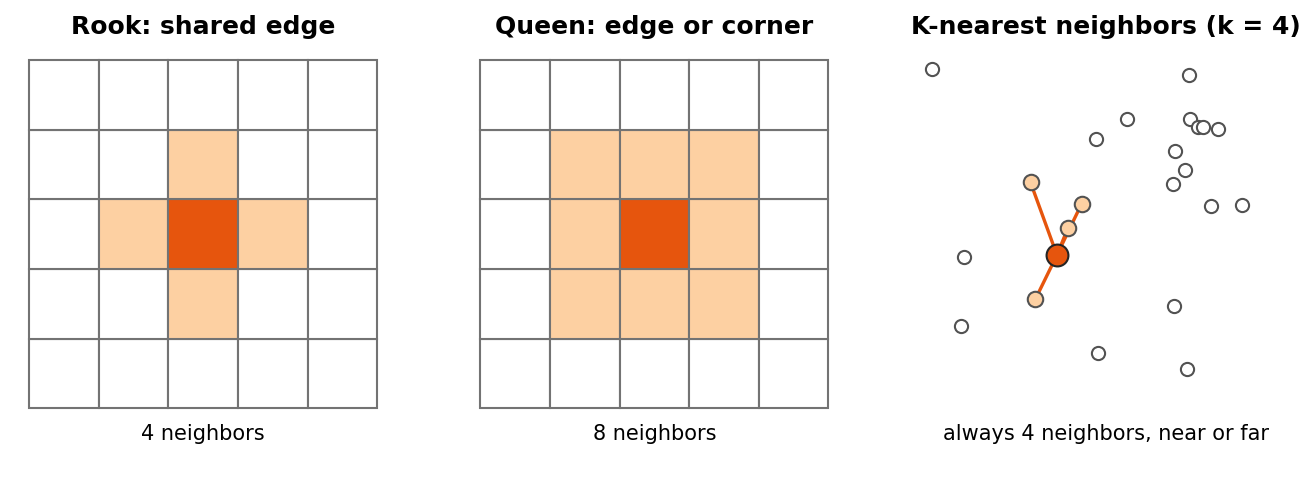
Before PySAL can compare a place with its neighbors, you must say who the neighbors are. This is the spatial weights matrix \(W\): a table with one row and one column per place, where \(w_{ij}\) is not zero when \(j\) is a neighbor of \(i\).
| Type | Neighbors are | Good for |
|---|---|---|
| Rook contiguity | Polygons that share an edge | Regular polygons and grids |
| Queen contiguity | Polygons that share an edge or a corner | Most polygon data, such as counties or tracts (the usual default) |
| K-nearest neighbors (KNN) | The k closest centers | Points, or polygons of very different sizes; every place gets exactly k neighbors |
| Distance band | Every place within a set distance | Points, when “near” has a natural distance |
Two more ideas come up constantly:
-
Row standardization
(
w.transform = "R") divides each row by the number of neighbors, so each place’s weights sum to 1. A county with eight neighbors and a county with three are then treated alike, and multiplying the weights by the data gives the spatial lag: the average value of each place’s neighbors. - Islands are places with no neighbors under a contiguity rule, such as an island county. PySAL warns about them. Drop them, or give them neighbors with a KNN or distance rule.
Spatial weights are the hardest idea here. Use the chess analogy (Rook moves straight, Queen also moves diagonally) and draw a 3 by 3 grid before showing code. Also stress that an unfiltered LISA map (without the p-value cutoff) shows many false hotspots.
1. Build spatial weights
counties is a GeoDataFrame of Indiana counties with a
median_age column, projected to meters.
PYTHON
from libpysal.weights import Rook, Queen, KNN

w_rook = Rook.from_dataframe(counties, use_index=True)    # shared edge
w_queen = Queen.from_dataframe(counties, use_index=True)  # shared edge or corner
w_knn = KNN.from_dataframe(counties, k=4)                 # 4 closest centers

print(w_rook.mean_neighbors, w_queen.mean_neighbors)
w_queen.transform = "R"    # row standardize: each county's weights sum to 1
2. Global Moran’s I
PYTHON
from esda.moran import Moran

mi = Moran(counties["median_age"], w_queen, permutations=999)
print(f"I = {mi.I:.3f}, p = {mi.p_sim:.3f}")- I clearly above 0 with p below 0.05: similar values cluster together
- I near 0: no spatial pattern
- I below 0: neighbors tend to be different
Reading the Moran scatterplot
The scatterplot puts each county’s value on the x axis and its spatial lag (the average of its neighbors) on the y axis, both standardized so that 0 is the mean.
- The slope of the fitted line equals Moran’s I (with row standardized weights).
- The four quadrants are the categories that LISA uses below: top right High-High (a high value among high neighbors), bottom left Low-Low, top left Low-High (a low value among high neighbors) and bottom right High-Low.
- Points far from the line are places that do not fit the overall pattern, and are worth a closer look.
You can compute the spatial lag yourself:
Could it be chance? Permutation tests
PySAL tests significance by permutation. It shuffles the values randomly among the places, for example 999 times, recomputes I for each shuffled map, and counts how often a shuffled map is at least as extreme as the real one. The pseudo p-value is
\[ p = \frac{M + 1}{R + 1} \]
where \(M\) is the number of
shuffled maps at least as extreme as the observed one and \(R\) is the number of permutations. With 999
permutations the smallest possible p-value is 0.001. Because the
shuffles are random, p-values can change slightly from run to run;
Moran_Local accepts a seed so that results are
repeatable.
3. Local Moran’s I (LISA)
PYTHON
from esda.moran import Moran_Local
from splot.esda import lisa_cluster

lisa = Moran_Local(counties["median_age"], w_queen, permutations=999, seed=42)
lisa_cluster(lisa, counties, p=0.05)     # only significant counties are colored
Labels: High-High (hotspot), Low-Low (coldspot), High-Low and Low-High (outliers), and Not significant.
Local results need care
Local Moran’s I runs one test per place: 92 tests for Indiana counties, and hundreds or thousands for tracts. With a cutoff of p < 0.05, about 1 place in 20 would look significant even on a completely random map. To be careful:
- use a stricter cutoff, such as
p=0.01; - apply a False Discovery Rate (FDR) correction, which lowers the cutoff according to the number of tests;
- treat significant clusters as places to investigate, not as proof.
Getis-Ord Gi* (esda.G_Local) is another common hotspot
statistic. It finds clusters of high or low values but does not separate
outliers the way LISA does.
Challenge 1: Rook or Queen?
Print the Rook and Queen neighbors of the same county, for example
w_rook.neighbors[0] and w_queen.neighbors[0].
Why can Queen never have fewer neighbors than Rook?
Queen counts every county that shares an edge (like Rook) plus any that only touch at a corner. So it always includes all Rook neighbors, and sometimes a few more.
Challenge 2: A second variable
Compute Global Moran’s I for pct_asian. Is it clustered?
Then make its LISA map.
Pitfalls
- The modifiable areal unit problem (MAUP). Results change with the units. The same people aggregated to counties, tracts or ZIP codes can show different clusters, or none. State the units you used and, if you can, check another.
- Small numbers. Rates and estimates for places with small populations swing widely by chance and can create false hotspots. American Community Survey estimates for small areas also have large margins of error. Look at population sizes and margins of error before interpreting a cluster.
- Edge effects. Places on the edge of the study area, such as border counties, have fewer neighbors, so their local statistics rest on less information.
- The weights are a choice. Rook, Queen and KNN can give different answers. Try more than one; robust patterns survive the change.
- Clustering is not causation. A High-High cluster of median age says where older populations are, not why.
Challenge 3: An outlier tract
A LISA map of median household income for Marion County tracts shows one tract labeled High-Low. What does that label mean, and what could explain it? What would you check before writing about it?
High-Low means the tract’s income is well above the mean while its neighbors’ average is below the mean, and the difference is unlikely to be chance under the permutation test. It could be a new upscale development, a gentrifying area, or an affluent enclave next to lower-income neighborhoods. It could also be a statistical artifact: check the tract’s population and the estimate’s margin of error, because a small tract with a large margin of error can produce an extreme value by chance. With hundreds of tracts, also remember that about 1 in 20 can be significant at p < 0.05 by chance alone.
Math
Global Moran’s I is
\[ I = \frac{N}{W} \cdot \frac{\sum_i \sum_j w_{ij}(x_i - \bar{x})(x_j - \bar{x})}{\sum_i (x_i - \bar{x})^2} \]
where \(N\) is the number of places, \(w_{ij}\) is the weight between places \(i\) and \(j\) (non zero only for neighbors), \(W\) is the sum of all weights, and \(x\) is the variable. The top of the fraction is large when neighbors are on the same side of the mean.
- Spatial weights define who is a neighbor: Rook (edges), Queen (edges and corners), KNN (closest)
- Global Moran’s I gives one number for clustering across the whole map
- The permutation p-value tells you whether the pattern could be chance
- Local Moran’s I (LISA) locates hotspots, coldspots and outliers; always filter by p-value
- Many local tests produce false positives; use stricter cutoffs or FDR, and treat clusters as leads
- Results depend on the units (MAUP), the weights, small populations and edges of the study area
Notebooks
| Level | Notebook | What you will do |
|---|---|---|
| Beginner | 2a. What Is a Neighbor? Spatial Weights | Load Indiana counties and compare Rook, Queen and KNN neighbors |
| Intermediate | 2b. Global Moran’s I | Test whether median age is clustered and read the Moran scatterplot |
| Advanced | 2c. Local Moran’s I and Hotspots | Map significant clusters for counties, then for Marion County tracts |
Content from Spatial Clustering
Last updated on 2026-10-25 | Edit this page
Estimated time: 85 minutes
Overview
Questions
- What is spatial clustering and when is it useful?
- Why must coordinates be in meters before clustering?
- How do K-Means, hierarchical clustering, DBSCAN and HDBSCAN differ?
- When is a cluster of points really a hotspot?
Objectives
- Prepare point data for clustering by reprojecting to a meter based CRS
- Find dense hotspots with DBSCAN and HDBSCAN and recognize noise points
- Divide points into zones with K-Means and choose k with the elbow method
- Choose a clustering method that fits the research question
- Explain how each method works, what it assumes, and how to choose its parameters
- Recognize the population at risk, data collection effects and other pitfalls in hotspot maps
Why spatial clustering?
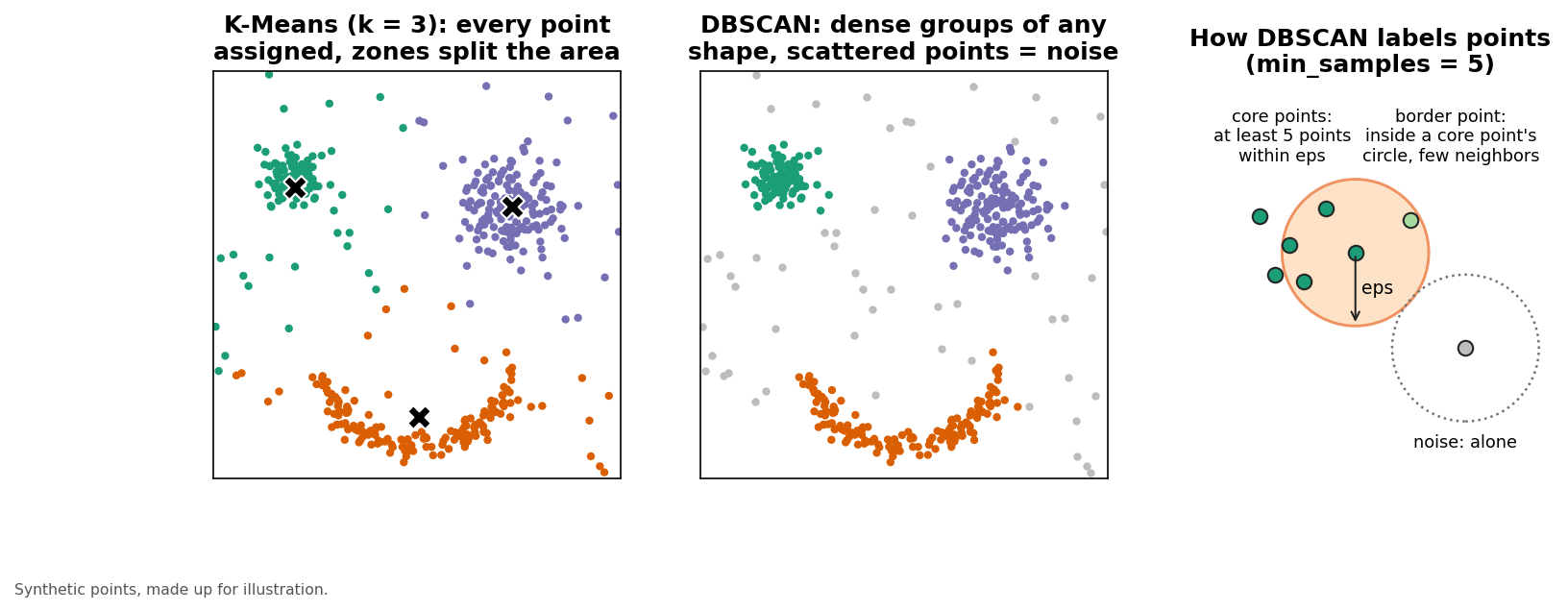
Clustering finds groups of points that sit close together: crime hotspots, disease outbreaks, clusters of archaeological finds, or concentrations of businesses. It turns thousands of points into a few areas you can describe and compare.
| Method | You choose | Noise points? | Best for |
|---|---|---|---|
| K-Means | Number of clusters (k) | No, every point is assigned | Dividing an area into zones |
| Hierarchical | Number of clusters or a cut height | No | Seeing structure at several scales (small datasets) |
| DBSCAN | Search radius (eps) and min_samples
|
Yes | Hotspots of any shape at a known distance |
| HDBSCAN | min_cluster_size |
Yes | Hotspots with varying density |
The notebooks use about 200,000 crime reports from the Chicago Data Portal and focus on robbery.
Points, patterns and the population at risk
Clustering looks for places where events (robberies, disease cases, archaeological finds) are concentrated. It is related to, but different from, the previous episode: spatial autocorrelation asks whether values attached to areas (such as median age by county) are similar among neighbors.
Before calling a cluster a “hotspot”, ask what you are comparing it with. Events happen where people are: a busy downtown has more robberies than a quiet suburb partly because far more people pass through it. A dense cluster of points may reflect the population at risk rather than an unusually high risk. Common ways to handle this are to compare with a background (rates per resident or per visitor, or a control set of points such as all reported crimes), or to aggregate the points to areas and analyze rates with the methods from the PySAL episode.
How the data were collected shapes them too. Crime reports reflect reporting and policing as well as crime itself, and the Chicago portal shows locations at the block level only to protect victims’ privacy, so many reports share exactly the same coordinates.
The most common mistake is clustering raw latitude and longitude.
Show what eps=1000 means in meters versus degrees before
running DBSCAN. Pause after each method and compare maps side by
side.
1. Load points and reproject to meters
PYTHON
import pandas as pd
import geopandas as gpd
import numpy as np

# read the CSV straight from GitHub into memory (nothing to download)
crimes = pd.read_csv("https://raw.githubusercontent.com/SpatialTurn/DataAnalysis/main/data/CrimesChicago20220225.csv")
crimes.columns = crimes.columns.str.strip()
robbery = crimes[crimes["PRIMARY DESCRIPTION"] == "ROBBERY"].dropna(subset=["LATITUDE", "LONGITUDE"])

robbery = gpd.GeoDataFrame(
    robbery,
    geometry=gpd.points_from_xy(robbery["LONGITUDE"], robbery["LATITUDE"]),
    crs="EPSG:4326",
).to_crs(epsg=32616)          # UTM zone 16N: x and y in meters

coords = np.column_stack([robbery.geometry.x, robbery.geometry.y])
Latitude and longitude are angles. One degree of longitude in Chicago is about 85 km while one degree of latitude is about 111 km, so distances in degrees are distorted. Always reproject first.
2. DBSCAN: density based hotspots
PYTHON
from sklearn.cluster import DBSCAN

db = DBSCAN(eps=1000, min_samples=50).fit(coords)   # eps in meters
robbery["dbscan"] = db.labels_                       # -1 means noise
A point with at least min_samples neighbors within
eps meters is a core point; nearby core points form a
cluster. Choose eps with a k-distance plot (see notebook
3b).
3. HDBSCAN: no radius needed
4. K-Means: zones
5. Hierarchical clustering and the dendrogram
PYTHON
from scipy.cluster.hierarchy import linkage, dendrogram, fcluster

sample = robbery.sample(2000, random_state=1)        # hierarchical is slow on large data
tree = linkage(np.column_stack([sample.geometry.x, sample.geometry.y]), method="ward")
dendrogram(tree, truncate_mode="lastp", p=20, no_labels=True)
sample["hier"] = fcluster(tree, t=6, criterion="maxclust")
Plot any result with
robbery.plot(column="dbscan", categorical=True, markersize=1).
How the methods work
DBSCAN
DBSCAN (Density-Based Spatial Clustering of Applications with Noise) sorts every point into one of three kinds:
- a core point has at least
min_samplespoints (counting itself) withineps; - a border point lies within
epsof a core point but does not have enough neighbors of its own; - a noise point is neither, and gets the label
-1.
Core points that are within eps of each other join the
same cluster, so clusters can take any shape, following a river or a
commercial street.
Choosing eps. Make a k-distance
plot: for every point, find the distance to its k-th nearest
neighbor (with k equal to min_samples), sort those
distances and plot them. Most points sit on a flat part of the curve;
where the curve bends sharply upward (the “knee”), points start to be
isolated. The distance at the knee is a good first choice for
eps.
PYTHON
import matplotlib.pyplot as plt
from sklearn.neighbors import NearestNeighbors

k = 50                                                    # same as min_samples
dist, _ = NearestNeighbors(n_neighbors=k).fit(coords).kneighbors(coords)
plt.plot(np.sort(dist[:, -1]))
plt.ylabel(f"distance to neighbor {k} (m)")
plt.xlabel("points, sorted")
plt.show()
Choosing min_samples. Larger values ask
for denser clusters and label more points as noise. With thousands of
points, values in the tens are common; with a few hundred, try 5 to
10.
DBSCAN’s weakness is that one eps applies to the whole
map, so it cannot find both a tight downtown cluster and a looser
suburban one at the same time.
HDBSCAN
HDBSCAN (Hierarchical DBSCAN) avoids choosing eps. In
effect it tries every value of eps at once, builds a tree
of how clusters split apart as the distance shrinks, and keeps the
clusters that last over a wide range of distances (the most
stable ones). You set min_cluster_size,
the smallest group worth calling a cluster. It finds clusters of
different densities, labels noise as -1, and reports how
strongly each point belongs to its cluster
(probabilities_).
K-Means
K-Means places k centers, assigns every point to its nearest center,
moves each center to the mean of its points, and repeats until nothing
changes. It assumes clusters that are roughly round and of similar size,
and it assigns every point, so outliers pull the
centers toward them. The result depends on where the centers start;
n_init=10 runs ten starts and keeps the best one.
To choose k, plot the inertia (the total squared
distance from points to their centers) for k = 2, 3, 4 and so on, and
look for the elbow where adding clusters stops helping much. The
silhouette score
(sklearn.metrics.silhouette_score, from -1 to 1) measures
how well each point fits its own cluster compared with the next nearest
one; higher is better. On large datasets, compute it on a sample with
sample_size=2000.
Hierarchical clustering
Agglomerative hierarchical clustering starts with every point as its own cluster and repeatedly merges the two closest clusters. The linkage rule defines “closest”: single linkage (the nearest pair of points, which tends to make long chains), complete linkage (the farthest pair), average linkage, or Ward (the merge that adds the least variance, which makes compact clusters). In the dendrogram, the height of each join is the distance at which two groups merge; cutting the tree at a height gives the clusters. Memory use grows with the square of the number of points, which is why the example uses a sample.
Challenge 1: K-Means or DBSCAN?
Map the K-Means and DBSCAN results side by side. Which one would you use to report “robbery hotspots” to a city council, and why?
DBSCAN (or HDBSCAN). K-Means assigns every robbery to a zone, even isolated ones, so its “clusters” cover the whole city. DBSCAN keeps only dense areas and labels scattered points as noise, which is what a hotspot means.
Challenge 2: Adjusting DBSCAN
Run DBSCAN with eps=500 and eps=1500
(meters). How do the number of clusters and the share of noise points
change?
Pitfalls
- Degrees instead of meters. Always reproject first (Section 1).
- Duplicate locations. Block-level coordinates put many reports on the same spot. Every duplicate counts as a neighbor, which can make an area look denser than it is.
-
Parameters shape the result. Report
eps,min_samples,min_cluster_sizeor k, and check how the map changes with other values (Challenge 2). - No significance test. Unlike LISA, these methods do not test whether a cluster could arise by chance. Comparing with random points, or using a scan statistic, is needed for that.
- Edges. Points near the edge of the study area, such as the city limits or the Lake Michigan shore, have fewer neighbors.
- Consequences. Hotspot maps can stigmatize neighborhoods and influence where police patrol, which in turn produces more reports in the same places.
Challenge 3: Reading a k-distance plot
Your k-distance plot (k = 50) stays fairly flat up to about 800 m and
then rises steeply. Which eps would you try first? What
would happen with eps=200 or eps=3000?
Start with an eps of about 800 m, at the knee of the
curve. With eps=200, few points have 50 neighbors that
close, so most points become noise and only the very densest spots
remain as small clusters. With eps=3000, almost every point
is a core point, so clusters merge into one or a few very large ones
that cover much of the city and say little about hotspots.
Hotspot or crowd?
DBSCAN finds a large robbery cluster in the Loop, Chicago’s downtown. Is the Loop a dangerous place, or just a crowded one? What extra data would help you decide?
Math
DBSCAN looks at the neighborhood of each point \(p\): all points within distance \(\varepsilon\) (eps). If that
neighborhood holds at least min_samples points, \(p\) is a core point. Core
points within \(\varepsilon\) of each
other join the same cluster, along with the border points near them.
Every other point is noise.
K-Means instead chooses \(k\) centers \(\mu_1, \dots, \mu_k\) that minimize the total squared distance \(\sum_i \lVert x_i - \mu_{c(i)} \rVert^2\), where \(c(i)\) is the center closest to point \(x_i\). This total is the inertia used in the elbow plot.
- Reproject to meters before clustering so distances are real
- DBSCAN and HDBSCAN find dense hotspots of any shape and label scattered points as noise
- K-Means splits all points into k round zones; choose k with the elbow method
- Hierarchical clustering shows how groups merge, but is slow on large datasets
- Pick the method that matches your question: hotspots or zones
- Choose
epswith a k-distance plot and k with the elbow method or silhouette score - A dense cluster may reflect the population at risk, duplicate locations or reporting, not high risk
Notebooks
| Level | Notebook | What you will do |
|---|---|---|
| Beginner | 3a. Exploring Crime Points | Summarize Chicago crimes and turn them into points in meters |
| Intermediate | 3b. DBSCAN and HDBSCAN | Choose eps, find robbery hotspots and compare with
HDBSCAN |
| Advanced | 3c. K-Means and Comparing Methods | Use the elbow method, a dendrogram and a side by side comparison |
Content from NDVI Analysis
Last updated on 2026-10-25 | Edit this page
Estimated time: 85 minutes
Overview
Questions
- What is NDVI and why is it useful?
- How do we read Landsat bands and compute NDVI in Python?
- How can we classify NDVI into land cover groups?
- What affects NDVI values, and how should they be interpreted?
Objectives
- Explain why vegetation is bright in near infrared and dark in red
- Read raster bands with
rasterioand convert them to surface reflectance - Compute, map and save NDVI as a GeoTIFF
- Classify NDVI with thresholds and summarize area by class
- Describe spectral signatures, image processing levels and resolution
- Recognize the limits of NDVI (season, clouds, saturation, mixed pixels) when comparing places and dates
Why NDVI?
Healthy leaves absorb red light for photosynthesis and strongly reflect near infrared (NIR) light. The Normalized Difference Vegetation Index (NDVI) uses that contrast to measure greenness from satellite images. It is easy to compute, works with most sensors (Landsat, Sentinel-2, MODIS), and is used for crop monitoring, drought, urban green space and land cover change.
| NDVI | Typical surface |
|---|---|
| below 0 | Water, snow, clouds |
| 0 to 0.2 | Bare soil, buildings, roads |
| 0.2 to 0.4 | Sparse vegetation, grass, early crops |
| above 0.4 | Dense, healthy vegetation |
The notebooks use one Landsat scene over Indiana (Collection 2 Level-2 surface reflectance). For Landsat 8 and 9, Band 4 is red and Band 5 is NIR.
How satellites see vegetation
A satellite sensor measures how much sunlight each patch of ground reflects in several bands, narrow ranges of wavelength. The share of light reflected is the reflectance, from 0 (all absorbed) to 1 (all reflected). Each kind of surface has a typical pattern of reflectance across wavelengths, its spectral signature.
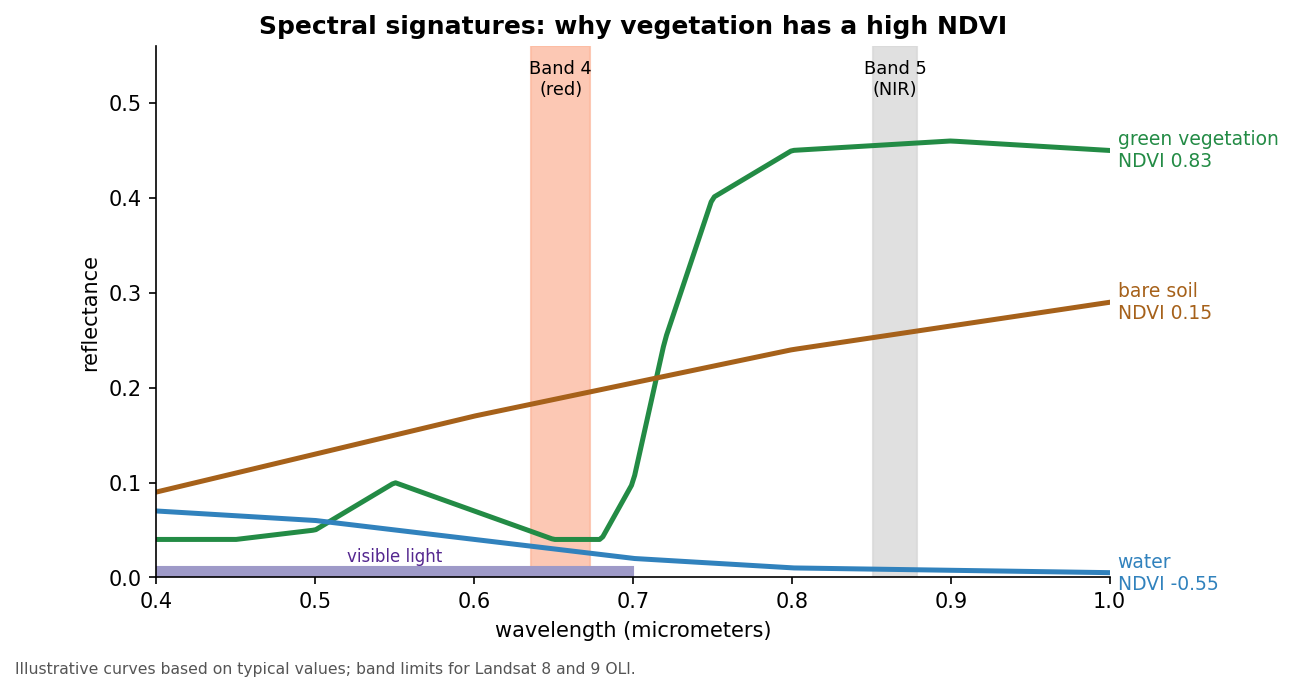
- Healthy vegetation absorbs most red and blue light, because chlorophyll uses it for photosynthesis, and reflects a little more green, which is why leaves look green. In the near infrared, just beyond what our eyes can see, the internal structure of leaves scatters light strongly, so reflectance jumps to 0.3 to 0.5.
- Bare soil and pavement reflect a moderate amount, rising gently with wavelength, so red and NIR are similar.
- Water absorbs nearly all NIR light, so it is dark in that band.
NDVI uses the steep rise between red and NIR (the red edge) that only vegetation shows.
Why a normalized difference?
The plain difference, NIR minus red, already separates vegetation from other surfaces, but it also changes with the brightness of the scene: the sun angle, slopes facing toward or away from the sun, and thin haze. Dividing by NIR plus red cancels much of that brightness effect and keeps every value between -1 and +1, so NDVI from different places and dates is easier to compare.
From pixels to reflectance
Landsat images are distributed at different processing levels:
| Product | What the values are | Use |
|---|---|---|
| Level-1 | Digital numbers (DN): calibrated sensor counts, still affected by the atmosphere | Needs conversion before indices are compared |
| Level-2 surface reflectance | Reflectance corrected for the atmosphere, stored as integers | Ready for NDVI after applying the scale and offset |
Collection 2 Level-2 values are stored as integers to save space;
multiplying by 0.0000275 and adding -0.2 turns them back into
reflectance. The value 0 marks pixels outside the scene. Level-2
products also include a QA_PIXEL band that flags clouds,
cloud shadows, snow and water. Masking the flagged pixels before
analysis stops a cloud from being counted as bare ground.
Resolution describes how much detail an image holds:
| Landsat 8 and 9 | Sentinel-2 | |
|---|---|---|
| Pixel size (red and NIR) | 30 m | 10 m |
| Red and NIR bands | Bands 4 and 5 | Bands 4 and 8 |
| Revisit | 16 days per satellite, 8 days with both | About 5 days with both satellites |
| Archive | Landsat images since 1972 (this sensor design since 2013) | Since 2015 |
Pause after the formula and make sure learners know which band is which. Each band is about 90 MB and is read from GitHub into memory, so the reading cell takes a few seconds.
1. Read the bands and convert to reflectance
PYTHON
import numpy as np
import matplotlib.pyplot as plt
import rasterio

# rasterio reads the bands straight from GitHub into memory; nothing is downloaded
LANDSAT = "https://raw.githubusercontent.com/SpatialTurn/DataAnalysis/main/data/landsat"

with rasterio.open(f"{LANDSAT}/band4.TIF") as src:     # red
    red = src.read(1).astype("float32")
    profile = src.profile
with rasterio.open(f"{LANDSAT}/band5.TIF") as src:     # near infrared
    nir = src.read(1).astype("float32")

red[red == 0] = np.nan          # 0 = outside the scene
nir[nir == 0] = np.nan

# Level-2 values are stored as integers; this converts them to reflectance (0 to 1)
red = np.clip(red * 0.0000275 - 0.2, 0, 1)
nir = np.clip(nir * 0.0000275 - 0.2, 0, 1)
2. Compute and map NDVI
3. Save NDVI as a GeoTIFF (optional)
PYTHON
profile.update(dtype="float32", count=1, nodata=np.nan)
with rasterio.open("ndvi.tif", "w", **profile) as dst:
    dst.write(ndvi.astype("float32"), 1)
Everything above stays in memory. Save a file only if you want to open the result in QGIS; it keeps the scene’s location, so it lines up exactly.
4. Classify NDVI
np.digitize gives each pixel a class number.
Three break values make four classes,
so we need four colors.
PYTHON
from matplotlib.colors import ListedColormap

classes = np.digitize(ndvi, [0, 0.2, 0.4]).astype("float32")   # 0, 1, 2, 3
classes[np.isnan(ndvi)] = np.nan

colors = ["#2b83ba", "#d7a26b", "#a6d96a", "#1a9641"]   # water, bare, sparse, dense
plt.imshow(classes[::4, ::4], cmap=ListedColormap(colors), vmin=0, vmax=3,
           interpolation="nearest")    # every 4th pixel keeps the plot fast
plt.title("NDVI classes")
plt.show()
Challenge 1: Five classes
Classify NDVI into five classes with breaks
[0, 0.1, 0.2, 0.3]. How many colors do you need?
Four breaks make five classes, so you need five colors and
vmax=4.
Challenge 2: Mask water
Replace NDVI values below 0 with np.nan and map the
result. What is the mean NDVI of land only?
Interpreting NDVI carefully
- Thresholds depend on place and season. The table at the top is a rule of thumb. A dry grassland in August and a corn field in July can differ widely. Check thresholds against a true color image or a field visit.
- Saturation. In dense forest and crops, NDVI levels off around 0.8 to 0.9 and stops responding to further increases in leaf area.
- Soil background. Where vegetation is sparse, the soil underneath strongly affects NDVI. The Soil Adjusted Vegetation Index (SAVI) and the Enhanced Vegetation Index (EVI) were designed to reduce soil and atmospheric effects.
- Mixed pixels. A 30 m pixel in a city can contain a tree, a roof and a road. Its NDVI is a blend, so small green spaces such as street trees and yards are underestimated.
- Clouds and shadows lower NDVI and can be mistaken for bare ground or water.
Comparing dates: change detection
Subtracting NDVI from two dates (for example
ndvi_2024 - ndvi_2014) maps where vegetation was gained or
lost. Use scenes from the same time of year, because
crops and trees change through the seasons (their
phenology), and use the same processing level, ideally
from the same or a cross-calibrated sensor. Small differences of a few
hundredths are within the noise; look for large, coherent changes.
From thresholds to classification
Thresholding NDVI (Section 4) is the simplest way to classify land cover. Notebook 4c goes further:
- Unsupervised classification (K-Means) groups pixels with similar values across several bands; you name the groups afterwards.
- Supervised classification (Random Forest) learns from training samples you label, such as polygons of known forest, water and buildings, and then predicts every pixel. It needs good training data and an accuracy assessment: compare the predictions with reference points that were not used for training, and summarize the agreement in a confusion matrix.
Challenge 3: NDVI by hand
Compute NDVI for three pixels and say what each one probably is:
- red = 0.08, NIR = 0.40
- red = 0.20, NIR = 0.24
- red = 0.06, NIR = 0.03
- (0.40 - 0.08) / (0.40 + 0.08) = 0.32 / 0.48 = 0.67: dense, healthy vegetation
- (0.24 - 0.20) / (0.24 + 0.20) = 0.04 / 0.44 = 0.09: bare soil, a road or a roof
- (0.03 - 0.06) / (0.03 + 0.06) = -0.03 / 0.09 = -0.33: water
NDVI changes with the seasons, clouds and the atmosphere. Compare scenes from the same time of year, and use surface reflectance (Level-2) products rather than raw Level-1 values when possible.
Math
\[ NDVI = \frac{NIR - Red}{NIR + Red} \]
NDVI ranges from -1 to +1. Healthy vegetation has high NIR and low red reflectance, which pushes NDVI toward +1. Water reflects more red than NIR, so its NDVI is negative.
- NDVI compares NIR and red reflectance; for Landsat 8 and 9 these are bands 5 and 4
- Convert Level-2 values to reflectance
(
value * 0.0000275 - 0.2) before computing NDVI -
rasterioreads and writes rasters; reuse the inputprofilewhen saving -
np.digitizeturns NDVI into classes; n breaks give n + 1 classes - Vegetation’s spectral signature (low red, high NIR) is what NDVI measures; normalizing reduces brightness effects
- Interpret NDVI with care: thresholds vary, dense canopies saturate, pixels mix, and clouds and seasons change the values
Notebooks
| Level | Notebook | What you will do |
|---|---|---|
| Beginner | 4a. Computing NDVI from Landsat | Read bands, convert to reflectance, map NDVI and save a GeoTIFF |
| Intermediate | 4b. Classifying NDVI | Group NDVI into classes, map them and measure area per class |
| Advanced | 4c. Image Classification with Machine Learning | True color image, K-Means and Random Forest classification |