
Geoprocessing in Python
Last updated on 2026-10-20 | Edit this page
Overview
Questions
- What are the everyday geoprocessing operations, and what does each one produce?
- Why must a layer be projected before buffering or measuring?
- How do I estimate how many people live in a zone that cuts across census tracts?
- How do I do all of this with GeoPandas?
Objectives
- Explain buffer, dissolve, clip, intersect, difference and nearest join, and choose the right one
- Select features by location and explain how the choice of spatial predicate changes the answer
- Estimate a population inside a zone with areal weighting, and state the assumption behind it
- Measure straight-line distances to the nearest facility and recognize their limits
- Run each operation in GeoPandas on real Lafayette data
What is geoprocessing?
Geoprocessing means operations that take one or more
spatial layers and produce a new layer: a zone around every store, the
parts of tracts inside a city, the distance from each neighborhood to
its nearest clinic. A small set of operations covers most everyday GIS
work, and every GIS program (QGIS, ArcGIS Pro, GeoPandas, R’s
sf) offers the same ones under similar names.
This episode answers one question with them: how many people in Lafayette and West Lafayette live within 1 mile of a supermarket? The Geoprocessing in QGIS episode answers the same question with the same data by pointing and clicking, so you can follow either one (or both) and compare results.
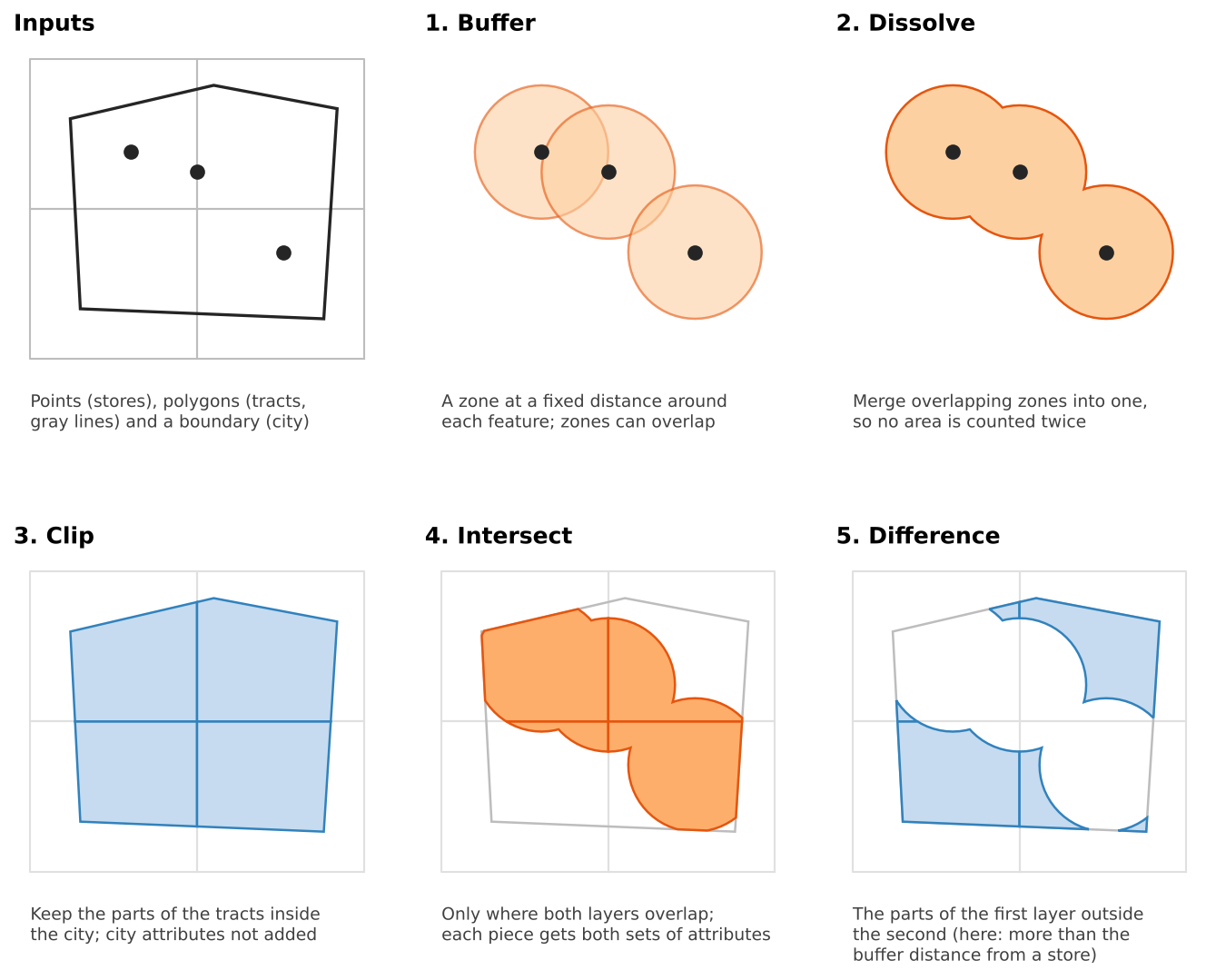
The operations
| Operation | Question it answers | Output | GeoPandas |
|---|---|---|---|
| Buffer | What is within d meters of each feature? | One polygon per feature | layer.buffer(d) |
| Dissolve | What is the combined area, or the total per group? | Merged features | layer.dissolve(by=..., aggfunc=...) |
| Select by location | Which features touch, contain or lie within another layer? | A subset (no new shapes) | layer[layer.intersects(shape)] |
| Clip | What part of this layer lies inside a boundary? | Cut shapes, own attributes only | gpd.clip(layer, boundary) |
| Intersect | Where do two layers overlap? | Cut shapes, attributes of both | gpd.overlay(a, b, how="intersection") |
| Difference | What part of A lies outside B? | Cut shapes of A | gpd.overlay(a, b, how="difference") |
| Nearest join | What is the closest feature, and how far is it? | Each row plus the nearest match and a distance | gpd.sjoin_nearest(a, b, distance_col=...) |
Two habits make the difference between a result you can trust and one you cannot:
- Clip versus intersect. Both cut shapes. Clip only uses the second layer as a cookie cutter; intersect also copies its attributes onto every piece. Use intersect when you need to know which zone each piece is in.
- Keep the original area. Once a tract is cut, you can no longer tell what share of it remains. Store its area in a column before any clip or intersect.
Projection comes first
A buffer distance and a measured area are in the units of the layer’s
coordinate reference system (CRS). Data from the web usually arrives in
EPSG:4326, latitude and longitude in degrees.
buffer(1609) on such a layer draws a circle 1,609
degrees wide, larger than the planet. A small value such as
buffer(0.015) looks plausible but is still wrong: in
Indiana a degree of longitude is about 85 km and a degree of latitude
about 111 km, so the “circle” is an ellipse. GeoPandas warns you
(“Geometry is in a geographic CRS”); take the warning seriously.
Convert every layer to a projected CRS in meters first. For Indiana, EPSG:26916 (UTM zone 16N) is the usual choice for local work. All layers in an operation must also share the same CRS; GeoPandas refuses to overlay layers with different ones. Foundations notebook 4b and the Data Management module’s Coordinate Reference Systems episode cover the theory.
Choosing a distance
A buffer is only as meaningful as its distance. Common thresholds in access research:
| Distance | Roughly | Typical use |
|---|---|---|
| 400 m (a quarter mile) | 5-minute walk | Bus stops, small parks |
| 800 m (a half mile) | 10-minute walk | Parks, transit stations, corner stores |
| 1.6 km (1 mile) | 20-minute walk | Supermarkets in urban areas (the USDA’s urban threshold) |
| 16 km (10 miles) | Short drive | Supermarkets in rural areas (the USDA’s rural threshold) |
Choose the distance from the literature or from a policy you are evaluating, write it down, and test whether your conclusion changes with a smaller or larger value. That last step is a sensitivity analysis, and it is cheap: change one number and rerun.
Selecting by location
Select by location keeps the features of one layer that pass a spatial predicate against another:
| Predicate | True when |
|---|---|
intersects |
The shapes share any point (touching counts) |
within |
The feature is completely inside the other shape |
contains |
The other shape is completely inside the feature |
centroid within
|
The feature’s center point is inside the other shape |
The predicate changes the answer, sometimes dramatically. With the 1-mile supermarket zone in Lafayette, 35 tracts intersect it, only 6 lie completely within it, and 24 have their center inside it. None of these is wrong, but a report that says “24 tracts are near a supermarket” must say which test produced that number.
From areas to people: areal weighting
Tracts do not line up with buffers or city limits, so a tract is often split. If 40% of a tract’s area falls in the 1-mile zone, how many of its residents live there? Areal weighting assumes they are spread evenly, so it assigns 40% of the population:
estimated people in a piece = tract population × (piece area ÷ tract area)
It is simple and transparent, and it is wrong in a predictable way: people live in houses, not in fields, parks, rivers or parking lots. Areal weighting overestimates people in empty parts of a tract and underestimates them in dense parts. It works best when the pieces are large or the tracts uniformly built up. Better methods use smaller units (block groups, blocks) or ancillary data such as land cover, a technique called dasymetric mapping. The Raster Processing episode shows how land cover can be summarized by tract, which is the first step.
Applied to Lafayette, areal weighting estimates about 114,000 residents inside the two cities (the 2020 Census counted about 115,000), and about 68% of them within 1 mile of a supermarket.
Counts, rates and dissolving
dissolve(by="column", aggfunc="sum") merges features
with the same value and adds up their numbers. Summing is right for
counts (people, households, households without a car)
and wrong for rates and medians (poverty rate, median
income). To get a rate for a merged area, sum the numerator and the
denominator separately and divide. For a median there is no exact
shortcut; use a population-weighted average as an approximation and say
so.
Distance to the nearest facility
A buffer gives a yes or no answer. A nearest join keeps the detail: it matches every feature (here, each tract’s center point) to its closest supermarket and records the distance. Two practical points:
-
Ties. If two stores are exactly equally close,
sjoin_nearest()returns both, adding a row. Always compare row counts before and after. - Distance to a polygon is measured to its nearest edge, not its center, which is usually what you want for parks or service areas.
Pitfalls
- Edge effects. The store layer covers only the two cities. A rural tract near the county line may have a supermarket just outside the data, so this episode limits the analysis to the city limits. Always ask what lies just beyond your study area.
- Straight line is not travel. Rivers, railroads and highways turn a 1-mile straight line into a much longer trip. The Data Analysis module’s Network Analysis episode, and Grocery Access Part 2 in the Case Studies module, measure along roads instead.
- Centroids are not people. A tract center can fall in a field. Population-weighted centers or smaller units give fairer distances.
- The modifiable areal unit problem (MAUP). Results change when the same data is grouped into different units (tracts versus block groups). Note it as a limitation; the Data Analysis module’s Spatial Autocorrelation episode returns to it.
- Data currency. OpenStreetMap stores open and close. Check the data against local knowledge.
The same analysis in QGIS
Every step here has a QGIS tool with nearly the same name (Buffer, Dissolve, Select by Location, Clip, Intersection, Difference, Join Attributes by Nearest). The Geoprocessing in QGIS episode walks through them with the same layers, and the numbers should match.
The workflow in code
The three notebooks build the analysis step by step. In outline:
PYTHON
import geopandas as gpd

stores = gpd.read_file(stores_url).to_crs(epsg=26916)           # project first
supermarkets = stores[stores["store_type"] == "Supermarket"]

zone = supermarkets.buffer(1609)                                  # buffer: 1 mile in meters
zone = gpd.GeoDataFrame(geometry=zone).dissolve()                 # dissolve the overlaps

tracts["tract_m2"] = tracts.area                                  # keep the original area
in_city = gpd.clip(tracts, city)                                  # clip to the city
pieces = gpd.overlay(in_city, zone, how="intersection")           # intersect with the zone
pieces["pop_near"] = pieces.area / pieces["tract_m2"] * pieces["total_pop"]   # areal weighting
Challenge 1: Which operation?
Name the operation (or operations) for each task.
- Show the parts of Tippecanoe County that are within 500 m of the Wabash River.
- Count the households in each tract that live within 500 m of the river.
- Keep only the bus stops that lie inside the West Lafayette city limits.
- Find the closest library to each school, and how far away it is.
- Buffer the river by 500 m (projected first), then dissolve if it is made of several segments.
- Intersect the tracts with the dissolved buffer, then areal weighting on the households column. Keep each tract’s original area before intersecting.
-
Select by location with
within(or clip, which gives the same points for a point layer). -
Nearest join (
sjoin_nearestwithdistance_col).
Challenge 2: Spot the mistake
A classmate’s notebook claims that 100% of the city’s residents live
within 1 mile of a supermarket. Their code starts with
stores = gpd.read_file(url) and goes straight to
stores.buffer(1609). What went wrong, and how do you fix
it?
The layer is still in EPSG:4326, so the buffer distance was read as
1,609 degrees: each buffer covers the whole planet, and
every tract falls inside it. Fix: add .to_crs(epsg=26916)
right after reading every layer, then buffer by 1609 meters. Check
stores.crs before any measurement.
Challenge 3: Is the estimate too high or too low?
Census Tract 104 contains most of Purdue’s residence halls and also large areas of lawns and playing fields. Half of the tract’s area lies inside a park’s 800 m buffer, and the buffered half is mostly playing fields. Will areal weighting overestimate or underestimate the residents near the park? What would improve the estimate?
It will overestimate: areal weighting puts half the residents in the buffered half, but few people live on the playing fields. Better estimates use smaller units (census blocks), or land cover to move people onto developed land (dasymetric mapping, previewed in the Raster Processing episode). At minimum, report the assumption and check the tract on a basemap.
- Project every layer to a CRS in meters (EPSG:26916 for Indiana) before buffering, measuring or overlaying
- Buffer draws zones, dissolve merges them, clip and intersect cut shapes, difference keeps what lies outside, and a nearest join finds the closest feature and its distance
- The spatial predicate (intersects, within, centroid within) changes which features are selected; report it
- Keep the original area before cutting, so areal weighting can split counts by area share
- Sum counts, never rates or medians; areal weighting assumes an even spread and straight lines are not travel
Notebooks
| Notebook | What you will do |
|---|---|
| 2a. Buffers and Selecting by Location | Buffer Lafayette supermarkets by 1 mile, see what a buffer in degrees does, dissolve the zones and compare three ways of selecting tracts |
| 2b. Clip, Intersect and Dissolve | Clip tracts to the city, estimate the population within 1 mile with areal weighting, and total households without a car near and far |
| 2c. Distance and Nearest Features | Find the nearest supermarket (and park) to every tract center and map the distances |