
Summary and Setup
This is a new lesson built with The Carpentries Workbench.
Overview
Questions
- What is QGIS and why is it useful?
- How do I install QGIS on my system?
- How do I load spatial data into QGIS?
- How can I style and visualize data on a map?
- How do I export a finished map?
Objectives
- Install QGIS successfully
- Understand the QGIS interface
- Load and explore spatial datasets
- Create and style a simple map
- Export a publication-ready map
What is QGIS?
QGIS is a free, open-source Geographic Information System (GIS) used to: - Visualize spatial data - Analyze geographic patterns - Create professional-quality maps
Why QGIS?
QGIS is widely used in academia, industry, and government — and it’s completely free.
Installing QGIS
Step 1: Download QGIS
Go to the official QGIS website:
👉 https://qgis.orgClick Download Now
-
Choose the appropriate version:
- Windows → Use the Standalone Installer
- Mac → Download the macOS package
- Linux → Install via package manager (apt, yum, etc.)
Understanding the QGIS Interface
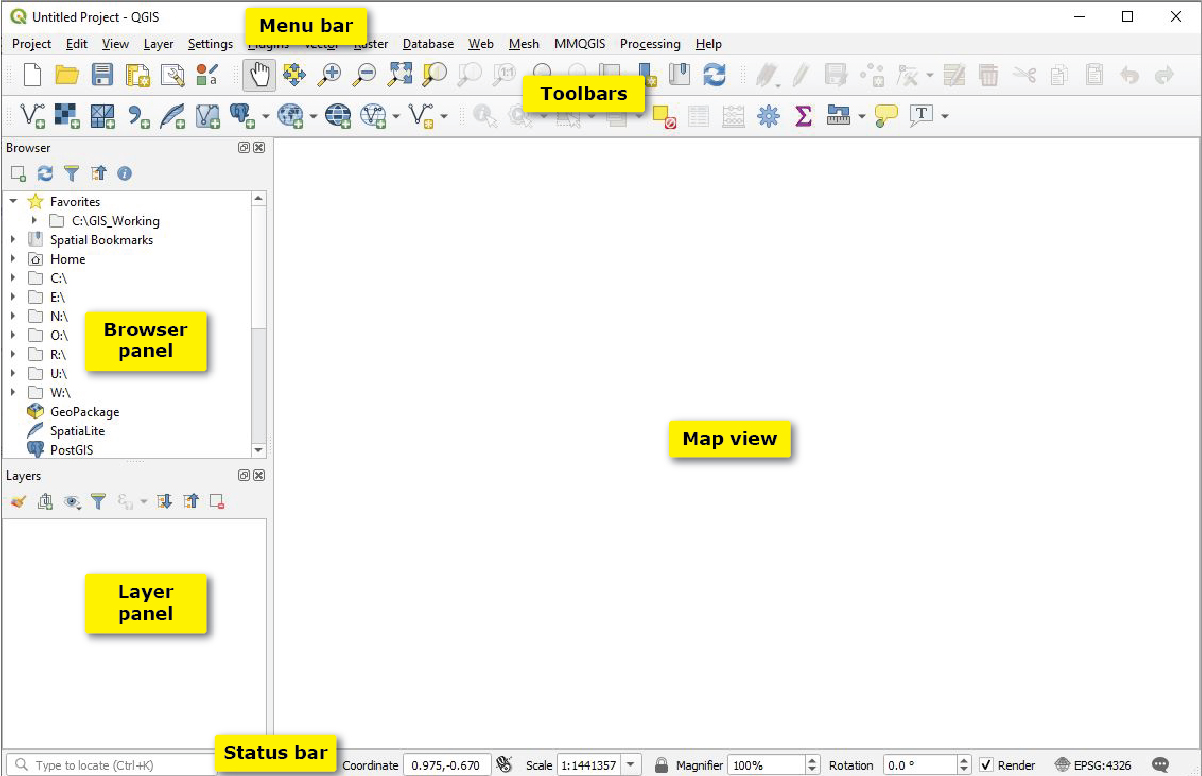
QGIS Interface Features.
Troubleshooting
- Colab: Plots not showing? Add %matplotlib inline at the top (usually automatic).
-
Local: package not found: Open terminal or code
cell in jupyter notebook and
!pipinstall package. - Need help? Raise hand during workshop or check Carpentries Python setup guide.
You’re all set! Proceed to Modules below in Data Visualization and Create your first map!
Happy visualizing!